
How to Build a Keyword Research System That Finds Traffic AND Buyers
Stop guessing. Learn the 8 seed keyword sources, expansion filters, and scoring formula B2B blogs use to find rankable topics that bring buyers.
How to Build a Keyword Research System That Finds Traffic AND Buyers
Most blogs chase traffic that never converts. They rank for “what is CRM” and celebrate 10,000 monthly visitors who read one paragraph and leave. The real money hides in keywords that signal purchase intent—terms like “CRM for real estate teams” or “HubSpot vs. Salesforce for small business.” The problem is that standard keyword research skips these buyer-stage terms because they look small in a keyword tool. They show 30 searches a month instead of 3,000, so content teams ignore them.
This article fixes that. It walks through a three-step system we have used across software, e-commerce, and professional service blogs: (1) build a wide seed list from eight sources that capture the full buyer journey, (2) expand and filter those seeds into a working database using Semrush or Ahrefs without burning your quota, and (3) clean, score, and prioritize so your content calendar is full of terms you can actually rank for that also drive leads or sales.
This is not a theoretical framework. Every step includes the exact filter settings, spreadsheet formulas, and decision rules we use in production.
Why Most Blogs Fail at Keyword Research (The Coverage Trap)
The typical failure pattern looks like this: a marketing manager opens Ahrefs, types “project management software,” sees a keyword difficulty of 78 and a volume of 49,000, and either gives up or commits six months to a pillar page that never reaches page one. Meanwhile, the company blog publishes a steady stream of “10 Tips for Better Project Management” articles that rank for nothing and convert for even less.
The root cause is coverage imbalance. Most teams over-index on high-volume category terms (the “project management software” level) and under-index on scenario, comparison, and commercial terms where buyers actually make decisions. A balanced keyword portfolio for a B2B blog should look roughly like this:
| Keyword Type | Target Share | Role |
|---|---|---|
| Category head terms | 10% | Future pillar targets; most get deferred until domain rating grows |
| Scenario/use-case terms | 25% | New blog’s primary battlefield; drives product-page internal links |
| Selection/how-to-choose terms | 20% | High conversion; buyer is evaluating options |
| Question/problem terms | 20% | Volume builders; feed FAQ and educational content |
| Comparison terms | 15% | Near-purchase intent; direct competitive positioning |
| Commercial/purchase terms | 10% | Lowest volume, highest value; direct quote or demo requests |
If your current keyword list is 80% category terms and 20% everything else, you have a coverage trap. The system below fixes it at the source by forcing you to mine eight distinct channels, each producing a different keyword type.
Step 1: Build Your Seed Keyword List from 8 Sources
A seed keyword list is not your final content plan. It is a coverage checklist that answers one question: have we looked everywhere our buyers might be searching? Spend 60–90 minutes on this step. The output is a 30–50 row spreadsheet with three columns: Seed Keyword | Source | Type.
Source 1: Your Own Product or Service Catalog (Start Here)
The fastest source is your own website. Pull category names, product type labels, feature categories, and SKU naming conventions. If you sell coffee equipment, your list starts with: espresso machine, burr grinder, pour-over kettle, cold brew maker, bean storage canister. If you run a SaaS accounting tool: invoicing software, expense tracking, bank reconciliation, tax reporting, multi-currency support.
These are mostly category head terms. They are competitive, but they anchor your taxonomy. The real value is that they give you root words to feed into autocomplete and keyword tools later.
Action: Export your product category tree or service menu. Copy every unique category and subcategory name into the seed list. Tag each as “category head term.”
Source 2: Google Autocomplete (The Long-Tail Goldmine)
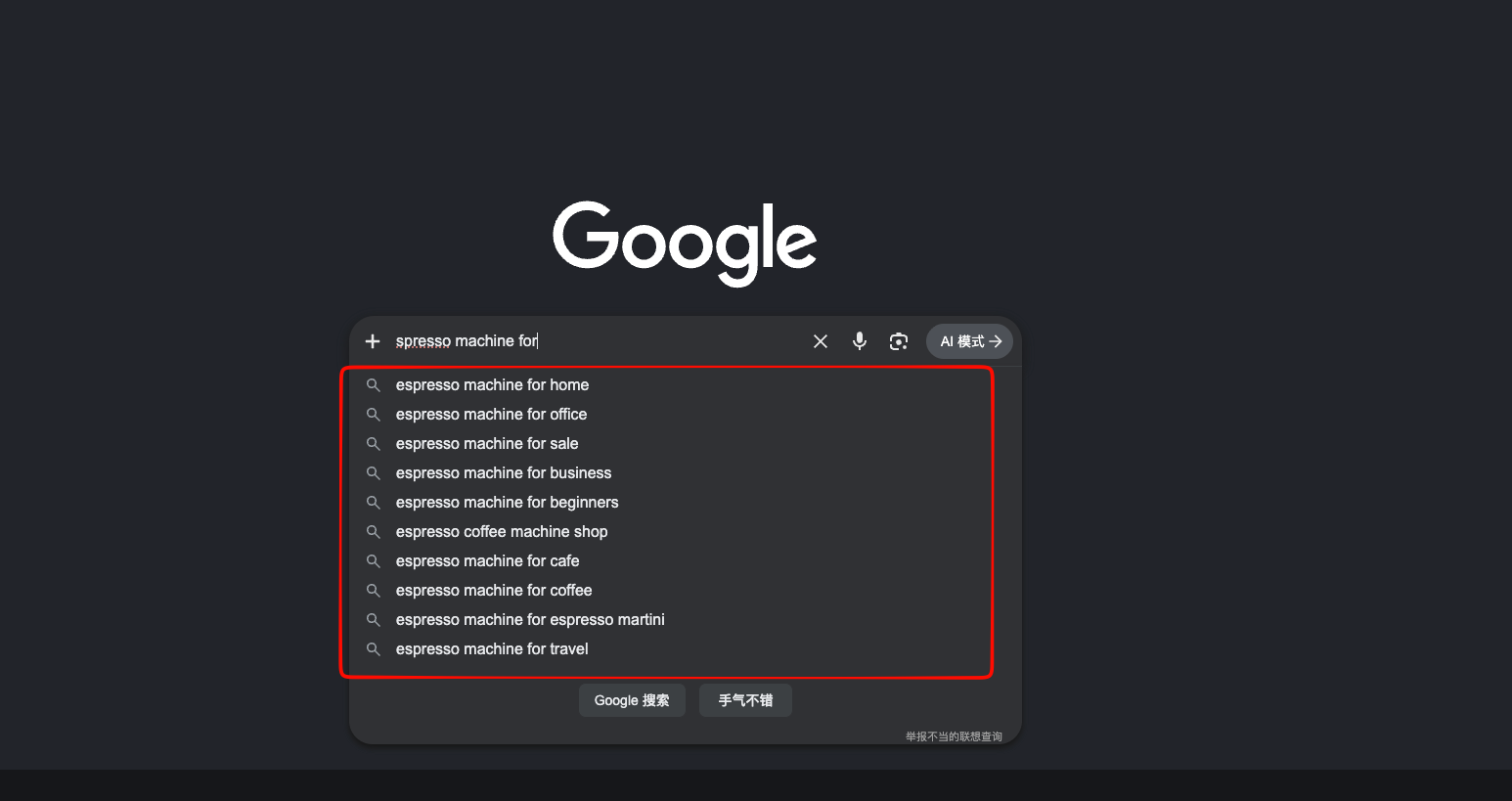
Open an incognito browser window. Type a root term from Source 1, but do not press Enter. Watch the dropdown suggestions. Then systematically expand:
- Add a space after your term and see what Google suggests.
- Add “for” after your term: “espresso machine for” → “espresso machine for small business,” “espresso machine for food truck.”
- Use wildcard patterns: “best espresso machine ” or ” espresso machine reviews.”
- Run a letter sweep: type your term + a, then b, then c, through to z. Google will surface the most common long-tail patterns for each letter.
These suggestions are ranked by real search frequency. They represent what people actually type, not what a tool thinks they might type. Most results here are scenario terms or question terms.
Action: Run autocomplete for your top 5–7 root terms. Record 10–15 suggestions per root. Add them to the seed list with source “Google Autocomplete.”
Source 3: People Also Ask (PAA)
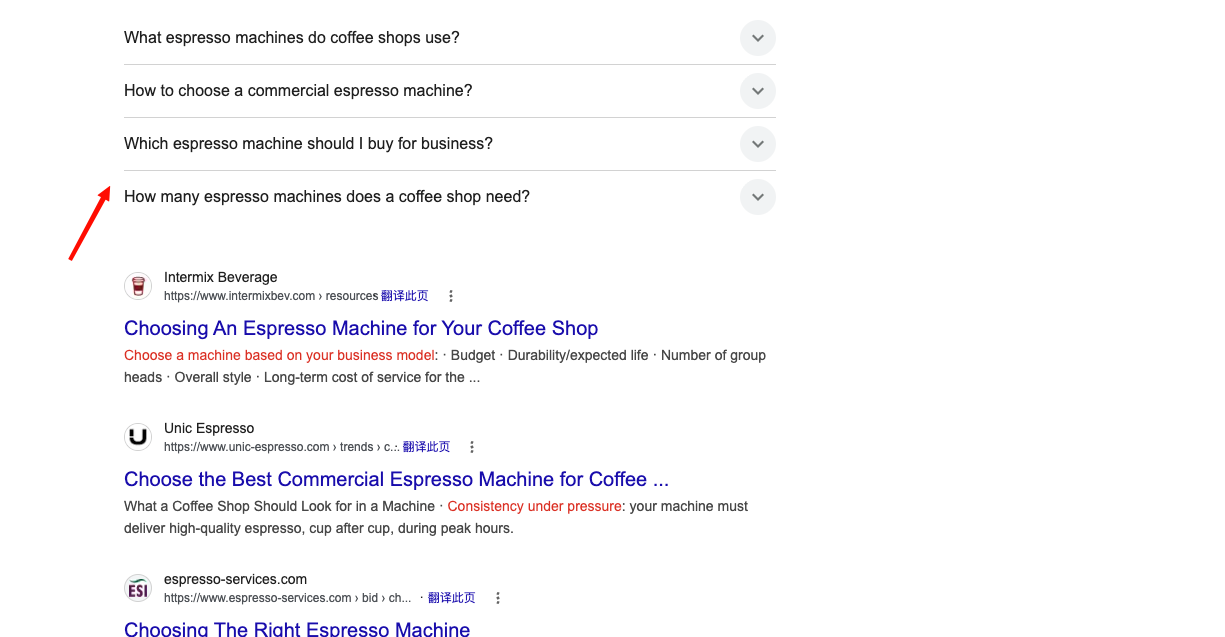
Run a search for one of your category terms. Look for the PAA box (usually appears after the first or second organic result). Click each question. Every click expands the box and reveals 2–3 additional related questions. Click recursively until you have 15–20 unique questions.
These are direct content ideas. A question like “What is the difference between a burr grinder and a blade grinder?” is a comparison article. “How do I choose an espresso machine for a coffee shop?” is a selection guide.
Action: Search 5 category terms. Mine PAA for each. Add questions to the seed list as “question/problem term.”
Source 4: Related Searches (Bottom of SERP)
After running a search, scroll to the bottom of the page. The “Related searches” or “People also search for” block often surfaces terms that autocomplete missed—especially broader conceptual terms and adjacent product categories.
Action: Copy 5–10 related searches per category term into the seed list.
Source 5: B2B Marketplace Autocomplete (Commercial Terms)
If you sell physical products or wholesale services, search your root terms on Alibaba, ThomasNet, or industry-specific marketplaces. The autocomplete suggestions here are radically different from Google’s. They include manufacturer, OEM, custom, factory, bulk, and wholesale modifiers.
For example, searching “espresso machine” on a B2B marketplace might surface “commercial espresso machine manufacturer,” “custom espresso machine OEM,” “espresso machine parts wholesale.” These are commercial/purchase terms with low search volume but extremely high conversion value.
Action: Run 3–5 root terms through marketplace search bars. Record commercial modifiers. Add to seed list.
Source 6: Customer Language (The Highest-Conversion Source)
No keyword tool will ever find these. Pull the exact words your customers use in:
- Sales call transcripts or CRM notes
- Support chat logs
- Contact form submissions
- Product page questions or reviews
- Email subject lines from inbound inquiries
A customer who writes “I need a grinder that doesn’t clog with oily dark roast beans” is telling you the keyword “grinder for oily beans” has commercial intent. A prospect who asks “Do you integrate with QuickBooks Desktop or only Online?” is giving you a comparison term.
Action: Review the last 50 customer interactions. Copy verbatim phrases that contain product descriptors, use cases, or comparison language. Add to seed list with source “Customer language.”
Source 7: Competitor Navigation and Top Pages
Pick 3–5 competitors. Not just the giants—include one or two companies your size. For each:
- Copy their main navigation categories and product menu labels.
- If you have Semrush or Ahrefs, enter their domain and view “Top pages” sorted by organic traffic. Look for blog posts or landing pages that overlap with your offering.
- Export their ranking keywords. Filter for terms you also serve.
Action: Build a 10–15 term list per competitor. Focus on terms where you have equivalent or better products/services.
Source 8: Google Search Console (If Your Site Is Live)
If your site already has indexed pages, open GSC → Performance → Queries. Sort by impressions. Any query with impressions is a term Google already associates with your domain. Even if you rank on page 5, the impression proves relevance.
Action: Export the top 50 queries by impressions. Add any not already in your seed list.
Coverage Check
Before moving to Step 2, audit your seed list against the six-type target. If commercial terms are only 2 out of 40, go back to Sources 5 and 6. If scenario terms are thin, revisit Source 2. The goal is breadth, not perfection.
Step 2: Expand Seeds into a Filtered Database
Your seed list is a launch checklist. Now you need a working database with volume, difficulty, and intent data. The mistake most teams make here is running every single seed through a keyword tool. That produces thousands of duplicates and burns through monthly export quotas.
The Root-Word Method
Instead of running 40 seeds, pick 6–10 root words that represent your core categories. For a coffee equipment business, the roots might be: espresso machine, coffee grinder, pour over, cold brew, bean roaster. For a project management SaaS: project management software, task tracking, team collaboration, Gantt chart, resource planning.
Run each root through Semrush Keyword Magic (or Ahrefs Keywords Explorer) once. The tool’s phrase-match and broad-match logic will automatically fan out into hundreds of long-tail variations per root. Running “espresso machine” and “espresso machines” separately just duplicates 80% of the output.
The Filter Settings (New Site, DR < 15)
Before exporting, apply these filters inside the tool:
| Filter | Setting | Why |
|---|---|---|
| Keyword Difficulty (KD%) | ≤ 30 | Terms a new or low-authority site can realistically rank for within 3–6 months |
| Intent | Informational (I) + Commercial (C) | Blog content lives here; Transactional (T) is usually product-page territory; Navigational (N) is brand searches |
| Exclude keywords | review, amazon, cheap, free, phone, cell phone, TV + competitor brand names | Removes low-intent or off-topic noise |
| Match type | Broad match | Catches the widest long-tail net |
| Questions toggle | Run a separate export | Isolates FAQ and educational content opportunities |
Critical note: low KD does not mean automatic inclusion. If a term is outside your scope—say, you do not sell “wifi-enabled coffee grinders”—drop it regardless of how easy it looks. Chasing irrelevant low-hanging fruit dilutes your topical authority.
Export and Merge
Export one CSV per root word, filtered. Then merge into a single master sheet. Before deduplication, you will typically have 500–1,500 rows. The raw volume looks overwhelming, but Step 3 cuts this down to 30–60 viable page targets.
Step 3: Clean, Deduplicate, and Score
This is where most keyword research stops being art and becomes engineering. You need a decision system that removes guesswork.
The Spreadsheet Structure
Create a master sheet with these columns:
| Column | Purpose |
|---|---|
| Keyword | Exact term from tool or seed list |
| Source | Where it came from |
| Root cluster | Which root word it belongs to |
| Type | Category / Scenario / Selection / Question / Comparison / Commercial |
| Intent | A (awareness) / B (selection) / C (comparison) / D (scenario) / E (technical) / F (design) |
| Role | Money (conversion-focused) or Traffic (volume-focused) |
| Volume | Monthly search volume from tool |
| KD% | Keyword difficulty |
| CPC | Cost per click (proxy for commercial value) |
| Traffic potential | Total traffic of the #1 ranking page (Ahrefs TP) |
| Can produce? | Yes/No—can you create content that matches this intent? |
| Conversion exit | Which product or category page can this link to? |
| Priority score | Auto-calculated (formula below) |
| Decision | Do / Defer (pillar-later) / Drop |
| Page assignment | If merged with another term, which is the primary? |
The Scoring Formula
Use these helper columns in Google Sheets (adjust column letters to your layout):
Role score:     =IF(F2="Money",3,1)
Volume score:   =IFS(G2>=300,3, G2>=100,2, G2>=30,1, TRUE,0)
KD score:       =IFS(H2<=10,3, H2<=20,2, H2<=30,1, TRUE,0)
Commercial score: =IFS(I2>=1.5,3, I2>=0.5,2, TRUE,1)
Priority score: =2*Role_score + Commercial_score + Volume_score + KD_score
Decision:       =IF(OR(K2="No", AND(F2="Money",L2="")), "Drop",
                   IF(H2>30, "Defer(pillar-later)", "Do"))
How to read the output:
- Money terms get double weight in the priority score. A commercial term with 20 monthly searches and KD 15 will outrank a traffic term with 500 searches and KD 25. This is intentional. B2B blogs should prioritize conversion over vanity metrics.
- Defer means the term is valid but too competitive for now. Move it to a “pillar-later” tab. Revisit when your domain rating crosses 20, 30, or 50.
- Drop means either you cannot produce matching content, or it is a money term with no conversion exit (no relevant product page to link to).
The Decision Tree (In Plain English)
When you look at any single row, ask in this order:
- Can we produce it? If the intent requires a comparison of two products and you only sell one, drop it.
- Can we convert it? If it is a money term but there is no logical product or service page to link to, either build that page first or drop the term.
- Can we rank for it? Does KD fall within your site’s current threshold? New sites: ≤ 30. Growing sites: ≤ 45. Established sites: ≤ 65.
- Is the volume acceptable? For money terms, any volume above zero is acceptable. For traffic terms, look at traffic potential (the total traffic the #1 page gets from all its keywords). If the #1 page pulls 400 visits/month from a cluster of related terms, a headline volume of 40 is fine.
- Is it already covered? If the top 10 results for this term are nearly identical to the top 10 for another term in your list, merge them into one page. Pick the higher-volume term as the primary.
Deduplication Rules
- Exact duplicates: Delete the duplicate row.
- Singular/plural pairs: Keep the version with higher volume as primary; note the other as a variant in the “Page assignment” column.
- Same intent, overlapping SERP: If two terms return 7+ identical URLs in the top 10, they are one page. Example: “how to choose a CRM” and “CRM selection guide” usually share most top results. Merge them.
The Output
After filtering for “Decision = Do” and sorting by Priority Score descending, you should have 30–80 page-level targets. These are not blog post titles yet. They are the raw material for the next phase: intent analysis, cluster mapping, and content brief creation.
FAQ
Q: I do not have Semrush or Ahrefs. Can I do this with free tools?
Yes, but slower. Use Google Keyword Planner for volume ranges and competition levels. Use Ubersuggest or Keyword Surfer for difficulty estimates. Use Google Search Console for existing query data. You will lack the precise KD% and traffic potential metrics, so lean more heavily on manual SERP checks: search the term, look at the DR/DA of the top 5 results, and judge whether you can compete in the next 6 months.
Q: My niche is tiny. I only found 15 viable keywords. Is that enough?
Fifteen strong, intent-matched, low-competition keywords will outperform 150 weak ones. A B2B software company we worked with launched with 12 blog posts targeting 12 distinct selection and comparison terms. Within 8 months, 9 of those 12 ranked in the top 5 and generated 40+ qualified demos. Depth beats breadth when breadth means irrelevance.
Q: Should I include brand names in my keyword list?
Only your own brand terms (navigational intent) and only if you do not already own the top result. Competitor brand terms are usually navigational for them, not commercial for you. Ranking for “Salesforce alternative” is viable; ranking for “Salesforce” is not.
Q: How often should I rerun this entire process?
Run the full seed-to-database process quarterly. Run a lighter refresh monthly: check GSC for new queries, review customer language for new terms, and scan competitor top pages for new topics they have published.
Q: What if my boss only cares about total traffic volume?
Show them the revenue or lead attribution from “Money” terms versus “Traffic” terms. In almost every B2B blog we have audited, 10% of the posts (the commercial-intent ones) drive 50–70% of the leads. Traffic without conversion is a vanity metric that inflates hosting costs.
What Comes Next
A keyword list is a map, not a destination. The next step is figuring out what type of content each keyword demands. A selection guide and a comparison article target different intents, even if they share similar keywords. Read our guide on how to analyze search intent and map content to the buyer’s journey before you write a single outline.
Once you understand intent, you will also need to group your keywords into topic clusters so your blog posts support each other instead of competing. And before you draft, lock in a differentiated content angle that gives readers a reason to click your result instead of the nine others on page one.
Last updated: June 2026