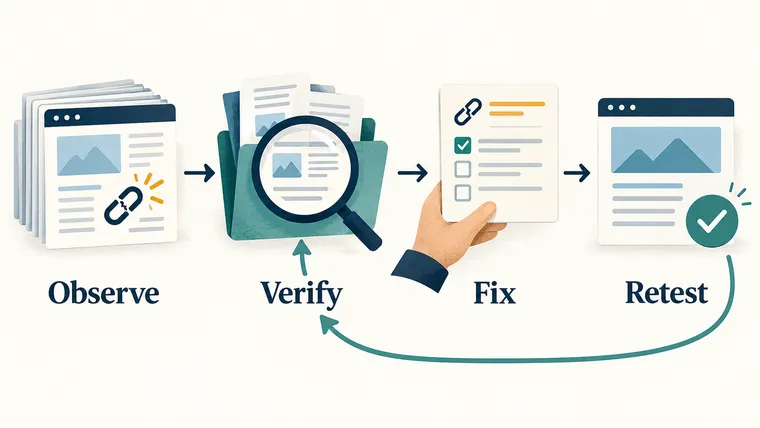
An AI-assisted SEO audit uses AI to sort website evidence and explain problems. The useful result is a repair plan: what is wrong, how you checked it, which pages it affects, and how you will know the fix worked.
A long list of automated warnings is only a starting point. AI can summarize crawl data and spot repeated problems, but each recommendation needs evidence from the site or an authoritative source.
🎯 For every finding, ask: Can we reproduce it, explain the harm, and test the fix?
1. Save the starting point before changing the site
Record the preferred domain, website technology, important page templates, languages, business goals, and recent migrations. A migration is a move or major change to the site’s URLs or platform.
Confirm access to analytics and the correct Google Search Console property. Save dated exports and screenshots as a baseline. Otherwise, a later rise or fall in traffic is difficult to interpret fairly.
2. Check whether search engines can reach and index the pages
Crawling means fetching a page. Indexing means deciding to store it as a possible search result. A page may be reachable without being indexed.
Check:
- Status codes: whether a URL loads successfully, redirects, or returns an error.
- Redirects: whether old addresses lead to the intended replacement.
- Canonical tags: which version of a duplicate page the site identifies as preferred.
- Robots directives: whether crawling or indexing is restricted.
- Sitemaps: whether the submitted list contains preferred, indexable URLs returning a successful 200 response.
- Duplicate routes and internal links: whether alternate addresses split signals or send readers to the wrong place.
Separate historical URLs shown in Search Console from pages the site currently publishes. An old deleted URL is not automatically a new production incident.
Do not use robots.txt as a substitute for noindex
A robots.txt block tells a crawler not to fetch a page. A noindex instruction tells a search engine not to include it in results. Google must be able to fetch the page to see noindex. Blocking both can prevent Google from reading the removal instruction. Google’s noindex documentation, checked October 2026, explains this distinction.
For a concrete audit finding, record both the robots.txt rule and the page’s actual indexing directive. Do not recommend “block everything” without deciding what outcome you need.
3. Check whether each page answers its target query
Read the title, description, main heading, and opening paragraph together. They should describe the same reader task and keep the primary keyword recognizable.
Use one clear main heading. Review the body for useful explanations, accurate supporting sources, an identifiable author where appropriate, and a sensible next step.
Do not treat a character limit as proof that a title or description works. A short title can still promise the wrong thing. Remove or replace citations that do not support the claims beside them.
For images, check that each one explains something relevant and has an accurate description. Describe the actual diagram or scene; do not repeat a keyword list.
4. Check that language signals match real translations
For genuine translated equivalents, each language page should normally identify its own preferred URL. Use hreflang, a way to tell search engines about language or regional alternatives, only between corresponding versions and check that they link back to each other.
A translated menu around an unchanged article does not turn that article into a new language version. Check the body as well as the navigation.
5. Test performance on real mobile layouts
Reserve space for images and components so text does not jump when they load. Compress static assets and cache files whose names change when their contents change.
Lab data comes from a controlled test. Field data comes from real visits. Use lab tests to investigate a problem; do not present one successful test as proof that all visitors have a good experience.
Google’s Core Web Vitals report uses these “good” thresholds:
| Measure | What a reader experiences | Good threshold |
|---|---|---|
| LCP: Largest Contentful Paint | How quickly the largest visible content appears | 2.5 seconds or less |
| INP: Interaction to Next Paint | How quickly the page responds to interaction | 200 milliseconds or less |
| CLS: Cumulative Layout Shift | How much content unexpectedly shifts | 0.1 or less |
The report evaluates the 75th percentile over the previous 28 days. Roughly speaking, three quarters of measured visits must be at or below the relevant value. Similar URLs may be grouped, so check whether a number describes one page or a group. These are experience thresholds, not promised ranking gains. Google Search Console: Core Web Vitals, checked October 2026.
💡 “No field data” means the report cannot establish a result. It does not mean the page passed. Record the limitation and use lab testing to investigate.
6. Check structured data against the visible page
Structured data is machine-readable information about the page, often written as JSON-LD. It must describe visible, accurate facts. Do not invent ratings, prices, reviews, authors, or FAQs.
Validate the generated JSON and test what the crawler can access. Where the target search engine or feature needs the information in the initial HTML, confirm it is there rather than assuming later rendering will supply it.
A valid test is not a promise of a rich result
Google says correctly marked-up pages are not guaranteed a rich result. Its test also cannot establish that a review or product claim is truthful. Check both technical validity and whether the facts match the page. Google’s structured data guidelines, checked October 2026.
7. Turn audit findings into work someone can finish
Rank findings by user harm, indexing impact, number and importance of affected pages, reversibility, effort, and confidence.
Each action needs the affected URLs, evidence, an owner, a rollback plan, and a clear acceptance test. For example: “The old product URL redirects to the intended replacement in one step, and internal links use the new URL.”
After deployment, crawl again and repeat the relevant checks. Monitor Search Console over the following weeks; do not judge an entire migration from same-day changes.
Use the AI SEO Prompt Generator to create a focused audit prompt from your evidence, and the keyword research guide to decide which pages need deeper content work.