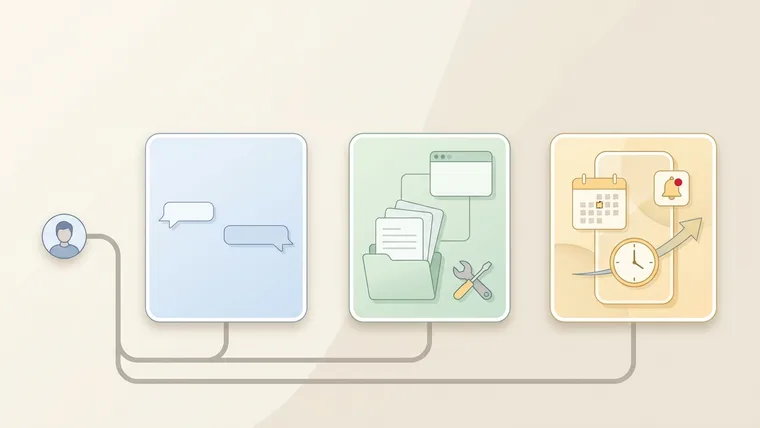
A personal AI agent is an always-on assistant that remembers your context, uses your apps and acts before you ask. A chatbot answers one request at a time and forgets the background. A DIY (do-it-yourself) agent remembers too, but you build its folders and rules yourself. Pick by one question: do you want less setup or more control?
🎯 Short answer: Use a chatbot for one-off tasks. Choose a personal agent like Meta’s Muse if you want the easiest start, and watch for lock-in. Choose a DIY agent if you want the strongest tools, your own system and the freedom to switch.
Why I care: most of us still use AI like a question box. You ask once, get one answer and start over next time. That’s useful. But if you want AI to take work off your plate, you need to know which type you’re using.
What is a personal AI agent?
A personal AI agent is AI that keeps working for you between conversations. It remembers what you’ve shared, connects to apps like email and calendar, and reaches out first when something needs you.
A chatbot is like a smart stranger at a help desk: you explain everything on every visit. A personal agent is a long-time assistant who keeps your files and texts you before appointments.
You’ll also hear “AI assistant.” The line is blurry, but most assistants wait for your request, while an agent can take steps on its own.
| Chatbot | DIY agent | Personal agent | |
|---|---|---|---|
| Remembers past context | A little; you re-explain details | Yes, in files you set up | Yes, set up for you |
| Who builds the memory | Nobody | You, folder by folder | The app |
| Acts before you ask | No | Only on schedules you set | Yes, it watches for changes |
| Examples (Oct 2026) | ChatGPT, Claude, Gemini | ChatGPT Work, Codex, Claude Code | Meta Muse, ChatGPT dots, Grok Bot |
| Best for | One-off questions and drafts | People who want control | People who want ease |
The market splits three ways. Big companies (Meta, OpenAI, Google, xAI) bundle personal agents into their apps and plans. Developer tools like Claude Code and Codex suit people at home with folders and terminals. Open-source projects like OpenClaw and Hermes Agent suit tinkerers who want full control.
Chat itself is already mainstream. A June 2026 Pew Research Center report found about 4 in 10 U.S. adults use chatbots to look up information. Among employed adults, 38% use them for work tasks. So the chat box is familiar. The question is when to move past it.
AI agent vs chatbot: when a chatbot is enough
Chatbots are best for one-off tasks that don’t depend on anything you shared before. ChatGPT (from OpenAI), Claude (from Anthropic) and Gemini (from Google) are general chat apps made for anyone. All three had a free version on Oct 19, 2026 (ChatGPT, Claude, Gemini).
For example, imagine you just got a health checkup report. You upload it to ChatGPT and ask for a plain-English summary of the key numbers. It does that well.
The limits show up fast. It only sees the one report you gave it today. It can’t connect the results to your past reports, your doctor’s notes or your supplements. Next month, you’d have to explain it all again.
That one-shot pattern is common. A 2025 National Bureau of Economic Research (NBER) study sorted ChatGPT messages by purpose. It found 49% were “Asking,” 40% “Doing” and 11% “Expressing.” Put simply, about half of all messages are people asking for information or advice.
My view is that chatbots are being replaced by agents that remember your preferences and finish tasks for you. Those agents come in two kinds: DIY and personal.
The data points the same way. Anthropic’s September 2025 Economic Index tracked “directive” chats, where people hand Claude a whole task. Their share rose from 27% to 39% in about eight months. In plain words, more people now hand off whole jobs.
So use a chatbot when the task stands alone. Move to an agent when it needs last month’s context.
How a DIY agent remembers you
A DIY AI agent remembers and updates what you’ve shared, so a new task doesn’t need a fresh explanation. These are the main options in October 2026:
| Tool | What it is | Good for | Skip it if |
|---|---|---|---|
| ChatGPT Work | OpenAI’s agent for longer tasks across your files and connected apps | Research, reports and file-heavy errands | You only need quick answers |
| Codex | OpenAI’s coding agent, which also works well on folders of text files | Developers and power users | You never want to look at files |
| Claude Code | Anthropic’s agent that runs in your terminal and reads instruction files like CLAUDE.md | Developers and fans of plain-text systems | You’d rather not touch a terminal |
Gemini Spark sits between the two types. Google calls it “your 24/7 personal AI agent,” and its Mac app can work with your local folders. It suits people already paying for Google AI. Skip it if you’re wary of broad folder access.
1. Rules and memory live in plain text files
The idea behind a DIY agent is simple. Your rules, preferences and memories are written as plain text files. The agent reads them only when a task needs them.
For example, imagine you ask Claude Code to end every reply with a “what’s next” section. That means fewer decisions for you. You say it once, and the agent writes the rule into a text file. It then reads and follows that file in every new task. Over time, that rule might be one of 100+ text files in your main folder.
Treat the main folder as your personal workbench, with one subfolder per area of your life or work. Start with an empty folder, tell the AI what you want and let it write, update and sort the files.
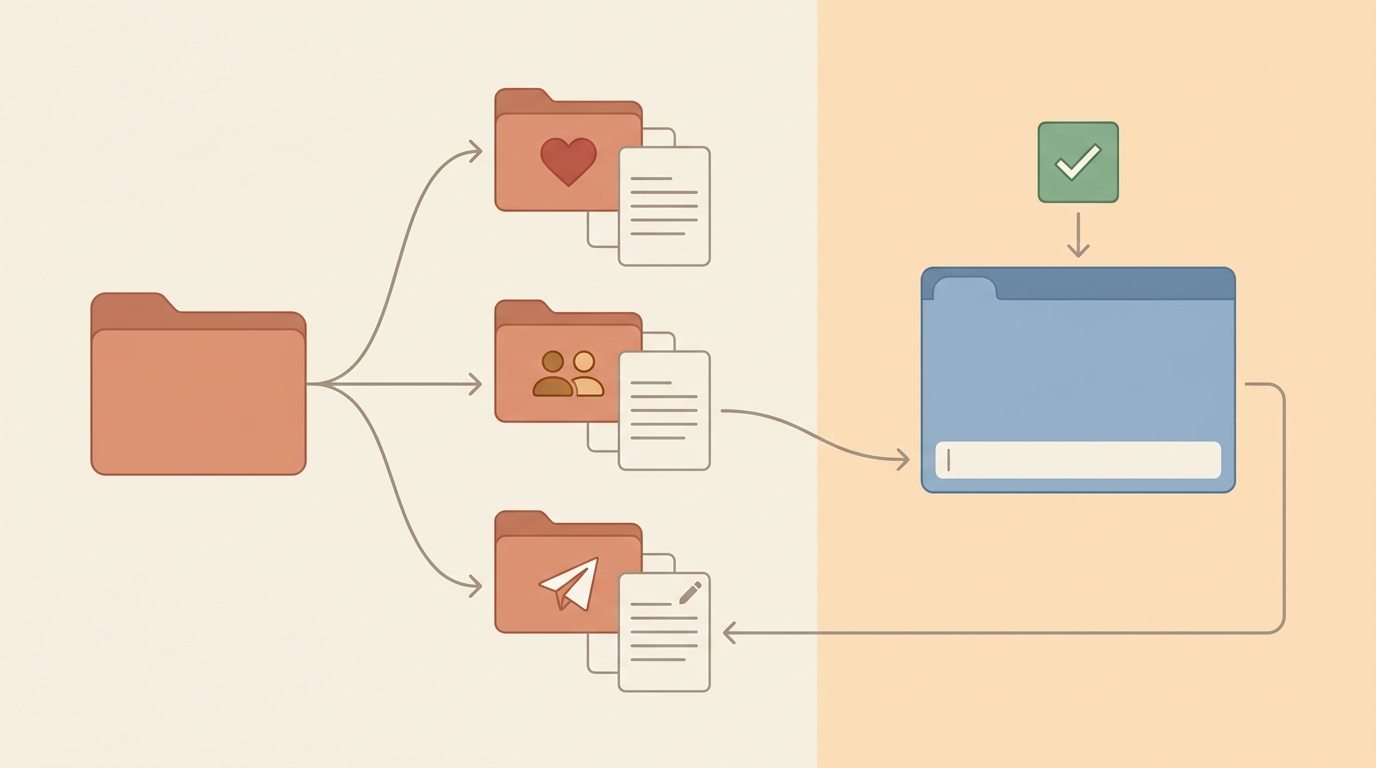
A DIY agent’s memory is just folders of plain text files. It reads them when a task needs them and writes updates back.
It’s called DIY because you build the folders and files yourself, mostly from scratch. You decide what goes where.
2. A health folder that updates itself
For example, imagine you give ChatGPT Work a health folder with old reports, doctor’s notes and a supplement list. When a new report arrives, you ask it to handle it. It does three things:
- Saves the new report into your health reports folder.
- Compares it with the past five years of reports and this year’s visit notes.
- Edits your health memory file to update your history.
Next year’s comparison then starts from everything you shared this year.
3. A family file that remembers allergies
For example, imagine a family folder with a memory.md file, a plain text file in Markdown format. It lists birthdays, food allergies and gifts you’ve already given. You plan a surprise birthday dinner for your brother at a certain restaurant. The agent checks the menu, sees his serious shellfish allergy and suggests a nearby place with similar prices.
4. One sentence that plans a whole trip
For example, imagine you say only, “Plan my LA trip for May 20–30.” The agent uses your travel folder and its connections to Notion, Google Calendar, Google Drive and Gmail. You add no other context. It then:
- Finds Marriott hotels in your usual price range.
- Checks visa rules for the passport you hold.
- Finds friends who live in LA in your Notion people database.
- Sets up a trip project using your saved Notion template.
- Checks your calendar for conflicts and flags tasks due during the trip.
Your hotel taste, friends’ cities and project deadlines live in different places. They all belong to one trip, and the AI ties them together. That’s why a DIY agent can feel like the ultimate second brain. You drop information in and get it back later.
Personal AI agent examples: what proactive help looks like
A personal AI agent is the proactive version of a DIY agent. It uses what it knows to help before you ask.
For example, imagine it’s the day before your yearly checkup. Your agent messages you to ask if you’d like a five-year health trend summary to bring. It spotted the appointment and linked it to what you’d shared. It looks like a small change, but a helper that keeps watch takes a real load off your mind.
Each of the main personal agents runs on its own cloud computer, a machine in a data center. Here they are in October 2026:
| Tool | What it is | Good for | Skip it if |
|---|---|---|---|
| Muse | Meta’s personal agent, as an app and in WhatsApp, launched Sept 8, 2026; it runs on a private cloud computer Meta calls Muse Secure VM | Beginners in the US (18+) who want the easiest start | You live outside the US or don’t want Meta holding your context |
| ChatGPT dots | OpenAI’s always-on agent inside ChatGPT, launched Sept 29, 2026, with its own cloud computer | Heavy ChatGPT users who want ongoing follow-ups | You’re on a budget, or you’re in the EEA, Switzerland or the UK, where Pro doesn’t include it |
| Grok Bot | xAI’s always-on agent, in beta; each agent gets its own cloud PC | People who already pay for SuperGrok, X Premium or Cursor (an AI code editor) | You don’t use any xAI, X or Cursor plan |
Under the hood, both types work the same way. That’s why it helps to understand DIY first. A personal agent just comes ready to use, with no main folder to build.
For example, imagine you want to get healthier without building a health folder or learning what memory.md does. You set a health goal in Muse. It interviews you about your wind-down routine and drafts a plan to improve your sleep. Then it saves the goal and adds a bedtime checklist.
A DIY agent can do all of that too. But you’d have to know to ask for the interview and the checklist. Muse makes those steps automatic. The real difference is whether you have to think of the instructions yourself. A personal agent just makes the start much easier.
Personal agents can also keep watch without being asked. For example, imagine handing one of these jobs to an agent:
- Job search: Tell it the roles and locations you want, and it keeps looking for matches.
- Running a business: It flags overdue invoices, so you don’t miss client payments.
- Subscriptions: It reminds you before a software plan renews.
- Shopping: It watches an item you plan to buy and tells you when the price drops.
A scheduled task can cover some of this, but it can miss things. Say you set a job search to run every morning. If your ideal job is posted in the afternoon and closes fast, you’ll miss it completely. A personal agent checks throughout the day and tells you as soon as something new appears.
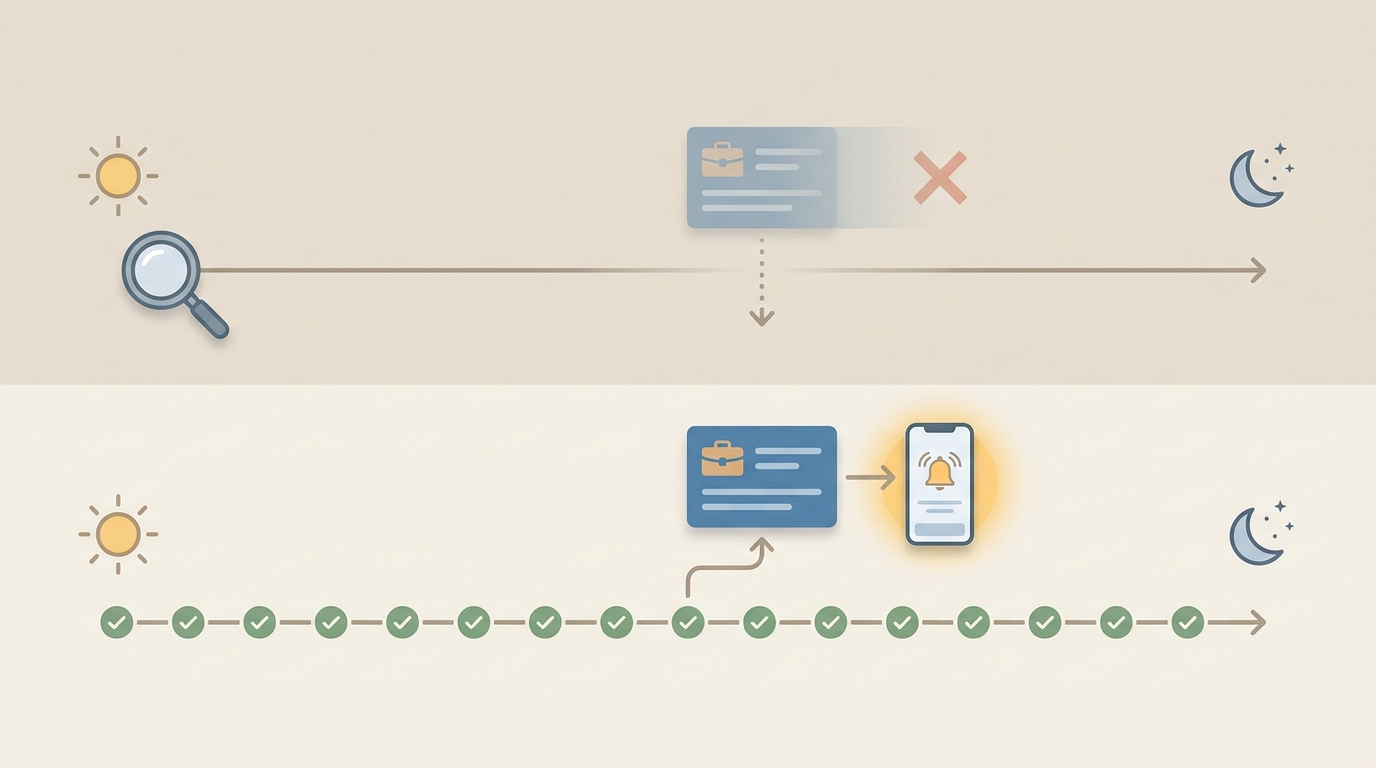
A morning-only schedule misses an afternoon posting. An always-on agent catches it and alerts you.
And because it runs on its own cloud computer, it keeps checking even with your laptop closed.
How much does a personal AI agent cost?
A personal AI agent can cost nothing or hundreds of dollars a month. Free tiers exist, but the most capable always-on agents sit in premium plans. Prices below were checked on Oct 19, 2026, in US dollars:
| Option | Cheapest way in | What paying more gets you |
|---|---|---|
| Chatbots: ChatGPT, Claude, Gemini | Free | More usage and stronger models; Claude Pro is $20/month billed monthly (Anthropic) |
| ChatGPT Work, Codex | Limited use on the Free plan | Wider access from Plus, longer sessions on Pro (OpenAI) |
| Claude Code | Claude Pro: $20/month billed monthly, or $17/month billed yearly | Max, from $100/month, for more usage (Anthropic) |
| Gemini Spark | Google AI Pro: $19.99/month in the US (Google); access began with Ultra and is expanding to Pro | Ultra, from $99.99/month, for higher limits |
| Meta Muse | Free, with usage limits (Meta) | More usage on paid plans |
| ChatGPT dots | ChatGPT Pro 100: $100/month (OpenAI) | Pro 200 ($200) or Pro 500 ($500) for more usage |
| Grok Bot | Included with SuperGrok, paid X plans or paid Cursor plans (xAI) | No standalone price; usage resets weekly |
| OpenClaw, Hermes Agent | Free, open-source software | You pay for the AI model you connect, or hardware to run one |
So start free. Try a free chatbot, or Muse if you’re in the US. Upgrade only when you hit a limit you actually feel.
Personal agent or DIY agent: which should you choose?
My advice: if you want the least effort and no system to build, choose a personal agent like Muse. Just watch out for getting locked into one company’s ecosystem. It’s a good fit for beginners.
Choose a DIY agent if all three of these are true for you:
- You want the strongest capabilities available.
- You like building a system around the way you work.
- You don’t want to be locked into one platform.
Some people still choose DIY, for three reasons:
- Personal agents are newer and less mature, so for now they’re much less capable.
- A DIY agent lets you organize your workspace your way. A personal agent pushes one standard system.
- Lock-in grows over time. The more an agent knows about you, the harder it is to leave.
On privacy, my take is simple: it’s a personal preference, and every product is a trade-off. You can use Muse as if your data might go straight to Mark Zuckerberg’s inbox.
Meta says Muse runs on a private, isolated computer, and Muse conversations aren’t shared with its ad systems. Its stronger promise, that not even Meta can access your data, is for the Muse Confidential VM. That hasn’t launched yet.
If you want a privacy-first personal agent, run open-source tools with downloadable models on your own machine. OpenClaw is a free, open-source personal assistant you host yourself. Hermes Agent, from Nous Research, is free under the MIT license and works with almost any model.
Both suit tinkerers who are comfortable with a terminal. The trade-offs: setup is hard and can feel intimidating, and you can’t run the strongest AI models locally.
A workbench made of folders and text files moves easily. You can hand it to Claude Code, ChatGPT Work or Gemini Spark, or to Hermes Agent and OpenClaw.
Where I think this is heading: the two types will keep moving closer. DIY tools will keep their room to customize, and personal agents will get smoother at reminders and follow-ups. So when you pick a tool, don’t tear down your existing files and habits just for a new name.
How to avoid lock-in with portable memory
The simplest way to avoid lock-in is to keep memory in open files you can take to the next tool. Anthropic’s Claude Code memory docs show a clean setup:
- Put project rules, like build commands and conventions, in
CLAUDE.mdat the project root. - Put personal preferences in
CLAUDE.local.mdand add it to.gitignore, the list of files Git won’t share. - Pull in other files with
@path/to/file, up to four levels deep. Rules shared with other coding tools can live inAGENTS.md, imported with@AGENTS.md. - Keep each
CLAUDE.mdunder about 200 lines.
Know the limits. CLAUDE.md is context, not enforced settings. To truly block an action, you need a PreToolUse hook, a script that runs before Claude uses a tool. Imports from outside the project also need your one-time approval. And never store secrets in memory files. Write down where each secret lives instead.
Shared memory servers and hosted memory services exist too, but each adds setup or a new kind of lock-in.
💡 Rule of thumb: Start with plain files. Prefer open formats, keep a way to export, and tie memory to the project, not the tool.
How to set up a personal AI agent safely
Don’t connect important accounts on day one. Set boundaries first, then give access step by step. The menu names below come from ChatGPT dots, but the steps fit most agents.
1. Connect only the apps you need
Start with one area, like health or travel. Connect only the apps that area needs. Add more once the agent has shown it handles them well.
2. Write custom rules before connecting big accounts
In ChatGPT dots, go to Settings > Personalization > Custom rules, under Permissions (OpenAI). Sort actions into four levels:
- Take action without asking: safe, routine actions.
- Take action when you say so: actions it may do once you ask.
- Ask before taking action: anything you want to approve each time.
- Hand off to you: actions you’ll always do yourself.
Next, the dot’s automatic action review checks each planned action against your instructions, permissions, custom rules and built-in safety rules. Built-in safety rules always win over yours. Some sensitive actions, like changing a password, must be done by you.
3. Let the agent interview you, with a stop condition
An agent can only help with what it knows about you. So let it interview you, but tell it when to stop. Copy this prompt:
Interview me so you can help with [goal: my business / my health / my job search / my weekly work].

How to interview:
- Ask one high-value question at a time.
- Ask for specific examples, and push back on vague answers.
- Cover my goals, current routine, tools, biggest bottlenecks and limits.

When to stop:
- Stop as soon as you know enough to act.
- Save your conclusions to memory as a short summary.
- Don't make anything up. Mark anything you're unsure about as "unconfirmed."
Why it works: one question at a time keeps answers specific, and the stop rule keeps it from asking forever. The “unconfirmed” label stops guesses from becoming facts in memory. For more on this, see how to ask AI better questions.
4. Give it one ongoing responsibility, then check its activity
Agents do best with an ongoing responsibility, not a one-off task. Give yours a name and one duty it repeats. For example:
Every Monday, collect updates on [topic]. Use first-hand sources and keep the links. Separate what's confirmed from what's a guess. Ask me before you send, post, buy or delete anything.Then check in. In ChatGPT dots, the Activity section of your dot’s profile shows current and delegated tasks. You can pause or stop them there (OpenAI).
Common mistakes to avoid:
- Connecting your main email and bank account on day one.
- Writing vague rules like “be careful” instead of naming actions.
- Letting the interview run with no stop rule.
- Saving passwords or API keys in memory files.
✅ Before you connect an important account, check that:
Your custom rules cover all four levels.
Only the apps you need are connected.
The agent has interviewed you and saved a summary.
You know where to pause or stop it.
When not to use a personal AI agent
Skip a personal agent, or wait, if any of these apply:
- Your tasks are one-off and don’t need past context.
- You need the strongest models running on your own machine.
- You can’t accept being tied to one company’s system.
- It isn’t offered where you live. Muse is for US adults 18+, and Pro plans in the EEA, Switzerland and the UK don’t include dots.
⚠️ What today’s personal agents can’t do:
Proactive research in ChatGPT dots uses read-only tools. It can’t send messages, change app content or control your browser.
You get one primary dot for now. OpenAI says it envisions teams of dots over time.
Muse’s “not even Meta can access it” setup isn’t available yet.
ZDNET’s test found Gemini Spark’s folder permission mentions sharing that folder’s content with third parties.
FAQ
How do I get my own personal AI agent?
Pick one of three paths. For the easiest start, use a ready-made agent like Meta’s Muse (US, 18+) or ChatGPT dots on Pro. For more control, give a DIY agent like Claude Code or ChatGPT Work a folder of plain text notes. For full privacy, self-host an open-source tool like OpenClaw or Hermes Agent.
What is a personalized AI?
A personalized AI is an assistant that adapts to you. It remembers your preferences, history and goals, and uses them in later answers. A chatbot with memory is lightly personalized. A personal AI agent goes further. It also connects to your apps and acts on what it knows, sometimes before you ask.
What is the best AI app for everyday use?
There’s no single best app, because it depends on the job. For quick questions and drafts, a free chatbot like ChatGPT, Claude or Gemini is enough. For ongoing help with reminders and follow-ups, try a personal agent. If you want to own your system and switch tools freely, build a DIY setup with plain text files.
Is there a free, open-source personal AI agent?
Yes. OpenClaw and Hermes Agent are free, open-source agents you run yourself. Hermes Agent uses the MIT license and keeps its data in a folder on your machine. It works with almost any model. The software costs nothing, but you pay for the model you connect or the hardware to run one.
Next step: write your first rule file today
Here’s one thing you can do today. Create a folder called “AI workbench” and add a file named rules.md. Write one rule in it: “End every reply with a ‘what’s next’ section listing only the remaining actions.” Then point your agent to the folder.
Add one new rule each week. No time to build? Set one goal in a personal agent and see what it asks. If you work in Claude Code, these Claude Code terminal keyboard shortcuts make that daily editing faster.