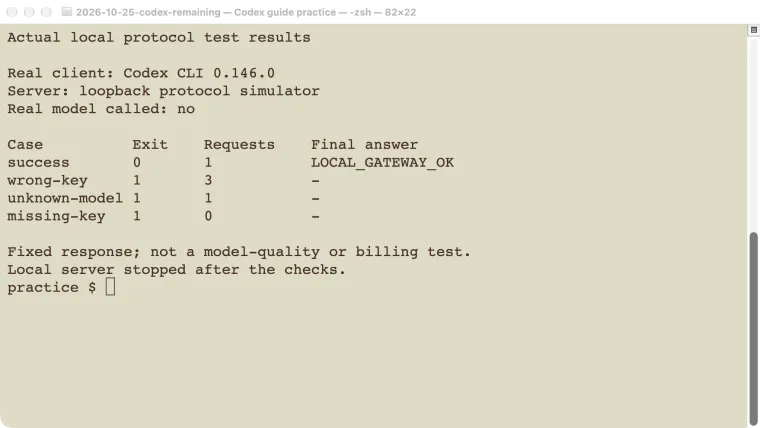
A Codex third-party API setup uses a custom provider to send the client’s requests to a gateway you choose. The address, credential, model name, and Responses protocol must agree. A service advertising “OpenAI compatible” is not enough if it only accepts Chat Completions. This guide explains the configuration and follows a limited but reproducible test: the real Codex CLI talking to a local protocol simulator. The simulator returned fixed text, so the test verifies client wiring and error handling. It does not establish the quality, availability, billing, privacy, or tool support of any commercial provider.
If you are choosing between a model API and a repository agent, start with Codex API options. This page covers routing an existing Codex client through a custom gateway.
Check the gateway’s protocol before changing settings
OpenAI’s gateway compatibility requirements specify the Responses path. With a base URL such as https://gateway.example.com/v1, the gateway must accept POST /v1/responses and preserve the request and response fields the client uses.
A working /chat/completions endpoint or Anthropic Messages endpoint does not prove this. A model-list page does not prove it either. Ask the gateway operator for the supported Codex configuration, model aliases, authentication method, and any limitations on streaming or tools.
The streaming response matters as much as the first text fragment. The client needs the sequence of server-sent events, including a successful completion event or an explicit failure. A proxy that buffers the entire answer or drops the ending event can make an otherwise accepted request appear stalled.
For an organization-managed gateway, use your administrator’s assigned endpoint and credential. Do not substitute the gateway’s upstream administrator key. The official provider-credential setup guide describes the supported route and configuration fields.
Keep the four configuration values together
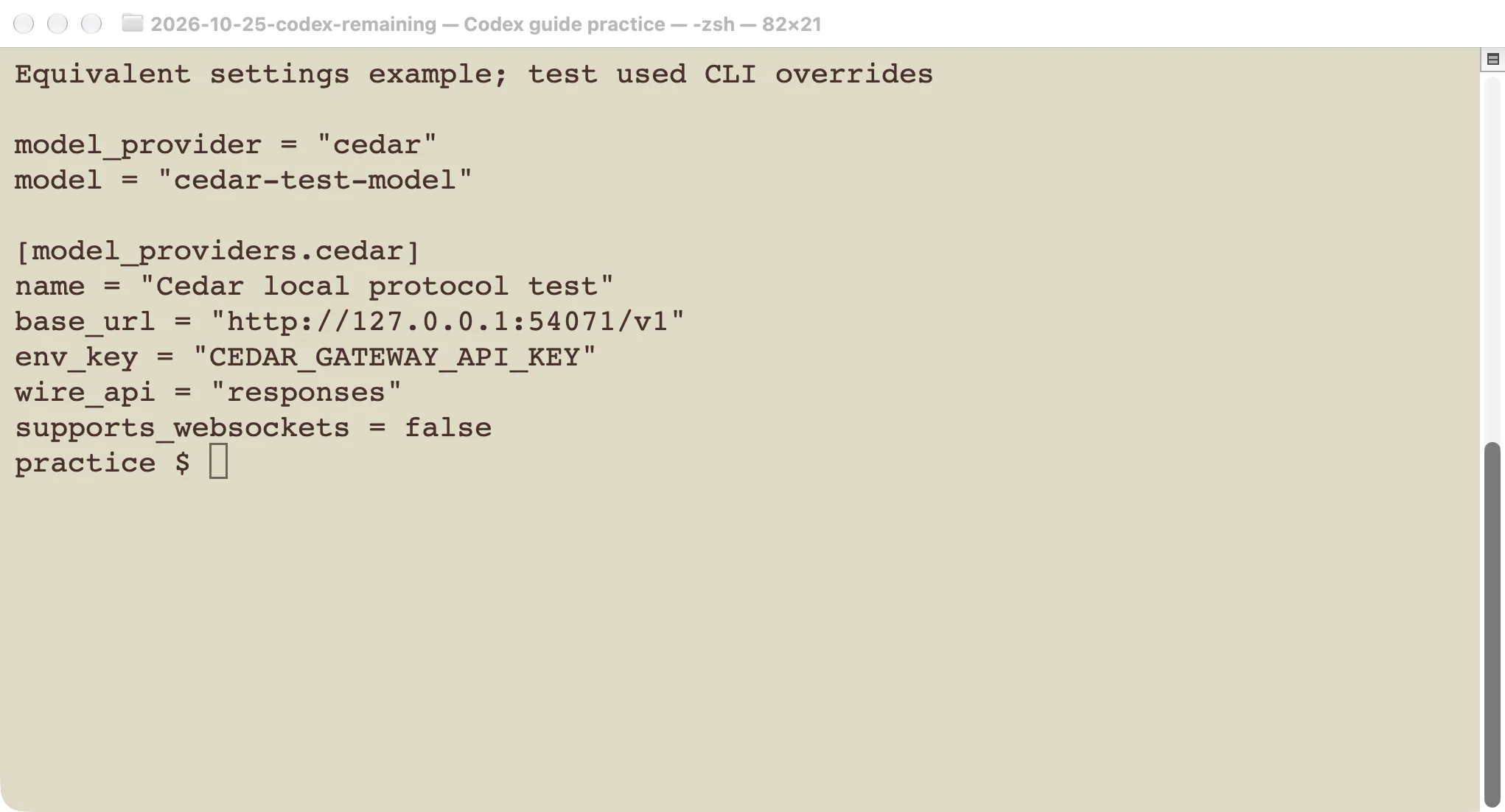
The basic configuration has four linked pieces: a provider identifier, a base URL, an environment variable containing a credential, and a model name routed by the gateway. This example uses reserved example-domain values. It will not work until you replace them with values supplied by your gateway operator.
model_provider = "company_gateway"
model = "YOUR_GATEWAY_MODEL_NAME"

[model_providers.company_gateway]
name = "Company gateway"
base_url = "https://gateway.example.com/v1"
env_key = "COMPANY_GATEWAY_API_KEY"
wire_api = "responses"
The identifier after model_providers. must match model_provider. The env_key value is the name of an environment variable, not the secret itself. Set that variable in the process environment that launches Codex. Avoid placing the key in a repository, screenshot, prompt, or shared config file.
The model string must be accepted by the gateway and route to the intended upstream model. Asking a model to identify itself is not a routing audit. For a custom alias, check the provider’s metadata instructions and the installed client’s supported configuration. A name alone does not grant the model extra reasoning, context, or tool capabilities.
Back up the configuration you intend to edit and preserve unrelated settings. In a managed installation, organizational requirements may limit which providers can be used. For file locations, profiles, and setting precedence, see the Codex configuration guide.
What we actually tested
On October 25, 2026, we ran Codex CLI 0.146.0 against a temporary HTTP server bound to 127.0.0.1. The server was a protocol simulator, not a model. It accepted a deliberately fake local test credential and returned the fixed text LOCAL_GATEWAY_OK in a Responses event stream.
We supplied the provider settings through command-line overrides. The TOML screenshot shows equivalent values for explanation; it is not evidence that a saved TOML file was loaded during this run. No personal default provider configuration was changed.
The test disabled WebSocket support for this provider to exercise the HTTP streaming path. The local model name, cedar-test-model, was only a route recognized by the simulator. It is not a model you can purchase or use on OpenAI’s service.
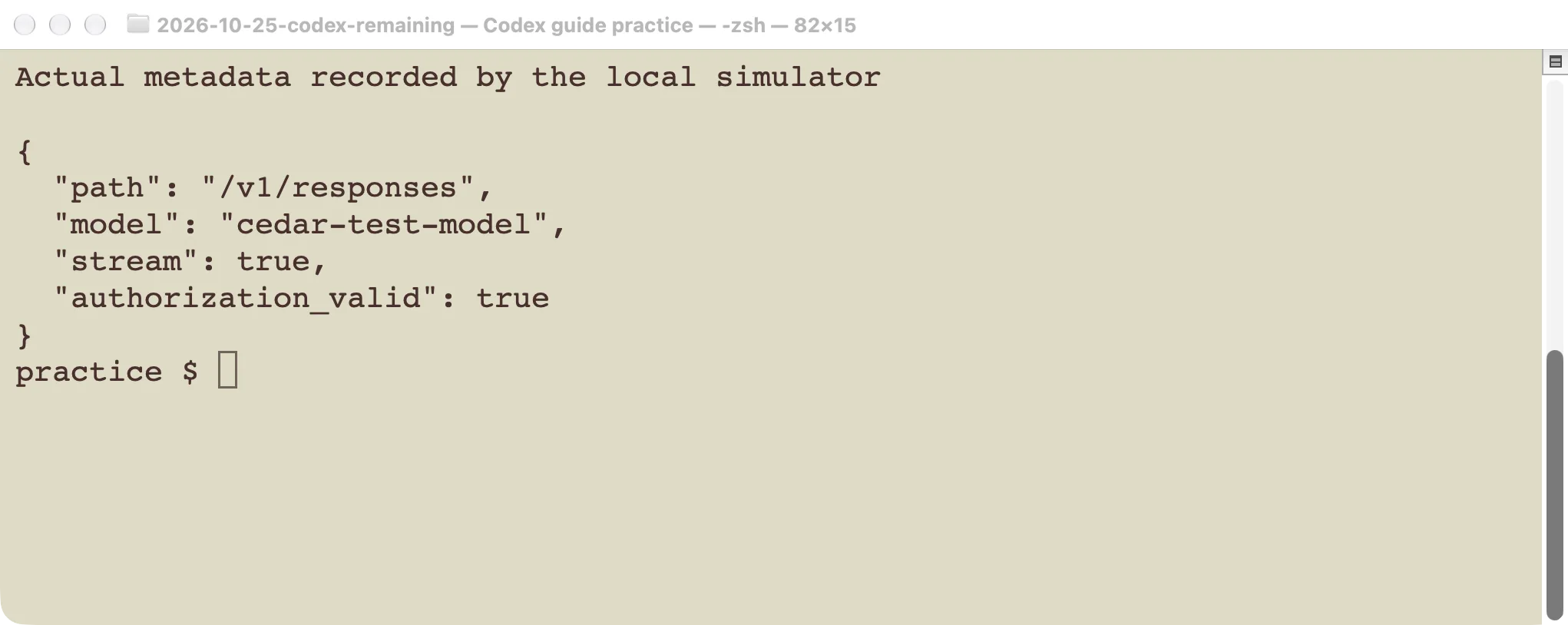
For the successful case, the simulator received one request to /v1/responses. It recorded the model alias, streaming flag, and whether the supplied credential matched the expected fake value. It did not write the prompt body or credential to the request log. Codex exited with status 0 and saved LOCAL_GATEWAY_OK as its final answer.
That establishes a narrow result: this client could select the custom provider, form the request, supply the expected bearer credential, parse the event stream, and complete the turn. The text was a constant from our own server. It is not a model-generated answer or a quality benchmark.
Use error details to locate the failure
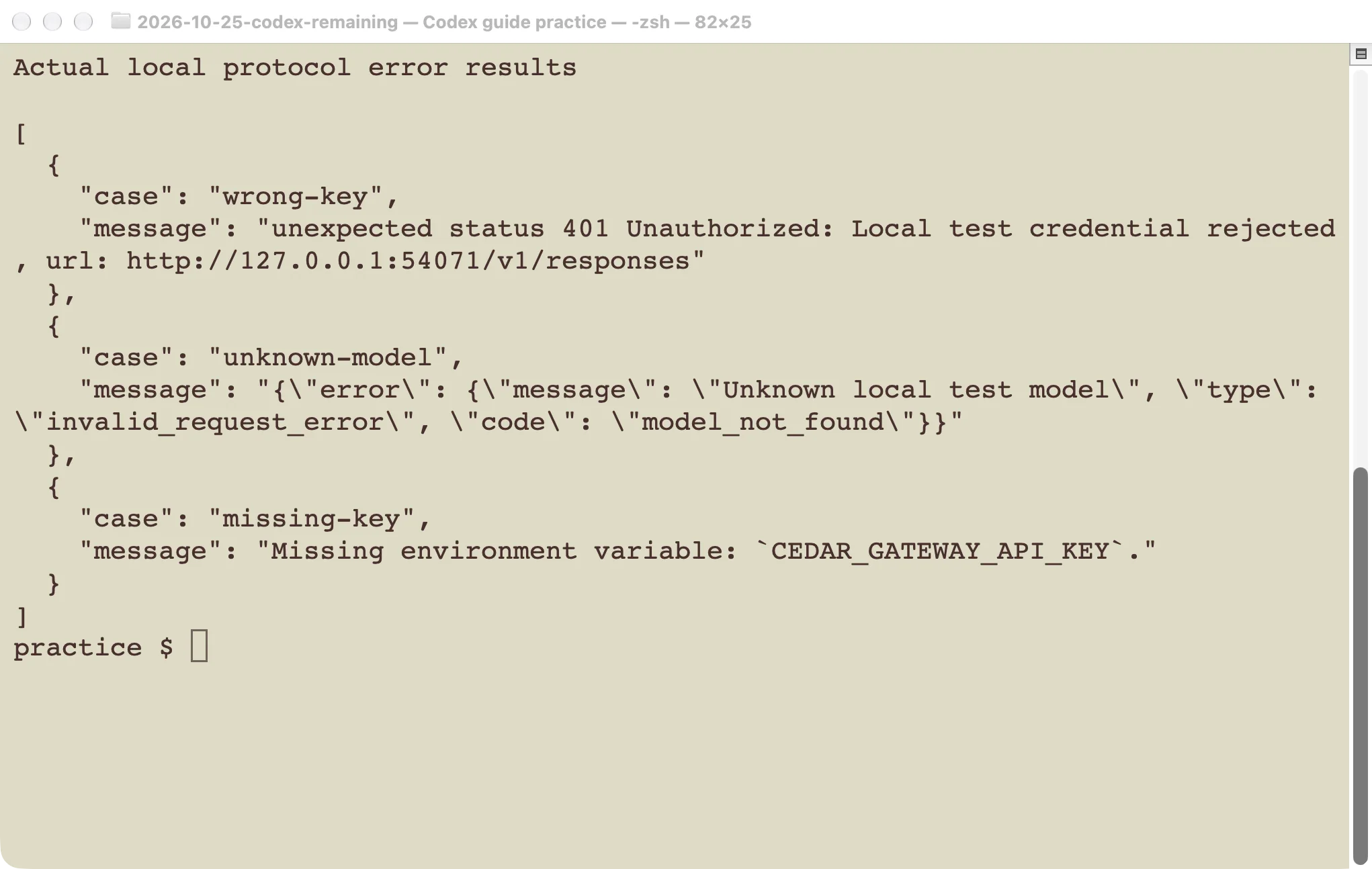
We changed one input at a time and kept the same local server. The cases produced different errors:
| Case | CLI result | Requests received by the simulator |
|---|---|---|
| Expected fake key and local model | Exit 0; fixed answer returned | 1 |
| Wrong fake key | Exit 1; HTTP 401 Unauthorized | 3 |
| Unknown local model name | Exit 1; model_not_found | 1 |
| Missing key environment variable | Exit 1; missing-variable error | 0 |
The missing-variable result is especially useful: the failure happened before any request reached the server. Changing the gateway’s model routing could not repair a variable that the local process never received. Check the exact variable name and the environment used to launch that process.
The wrong-key case reached the server and was rejected. Verify the intended credential source, scope, expiration, and authentication method. Do not treat every 401 as a network outage. This test observed three requests for that case; it does not establish a universal retry count across clients, versions, or authentication paths.
The unknown-model case reached the route but used a name the simulator did not accept. On a real gateway, confirm the client-facing alias and its upstream mapping. A credential change is not the first fix for an explicit model-routing error.
For other failures, keep the distinction between local startup errors, HTTP errors, incomplete streams, and model or tool failures. Record the version, endpoint path, model alias, time, and redacted error. Avoid dumping a full request that may contain your repository context.
A text response is only the first gateway check
Our simulator did not execute a tool call, continue a conversation, route to a real upstream model, or account for usage. Those require separate tests before relying on a gateway for repository work.
Start with an authorized practice folder and a small read-only request. Then test a follow-up turn that depends on the first answer. If you need file editing, use a disposable fixture and verify that the complete tool loop works: the client receives a call, executes the allowed tool, sends its result, and receives a final response.
Check failure behavior too. A useful gateway preserves errors rather than turning them into a hanging stream or an empty success. If you use WebSocket or incremental transport, validate its continuation behavior. Our HTTP-only simulator test says nothing about those paths.
For model identity and usage, inspect the gateway’s authorized records and billing documentation. A custom alias, client-side token estimate, or model’s own statement does not prove which upstream model served the request or what the invoice will contain. Ask the operator how source code, prompts, logs, and retention are handled before sending a sensitive repository.
Return to a known working configuration
If the gateway test fails, preserve the redacted error and restore the provider settings you changed. Remove only the test entries or select your previous profile. Do not delete the whole Codex configuration or sign out unrelated accounts as a first troubleshooting step.
Confirm the restored route with a small request before returning to a large coding task. Use the troubleshooting guide if the client itself still fails. Provider access, ChatGPT access, and a gateway’s own billing arrangement are separate checks; a successful connection to one does not prove entitlement to the others.
The local server used for this article was stopped after the four cases. No commercial gateway was endorsed or billed, and no real provider credential was used. Treat the example as a way to reason about configuration and errors, then verify the actual provider and features you intend to use.