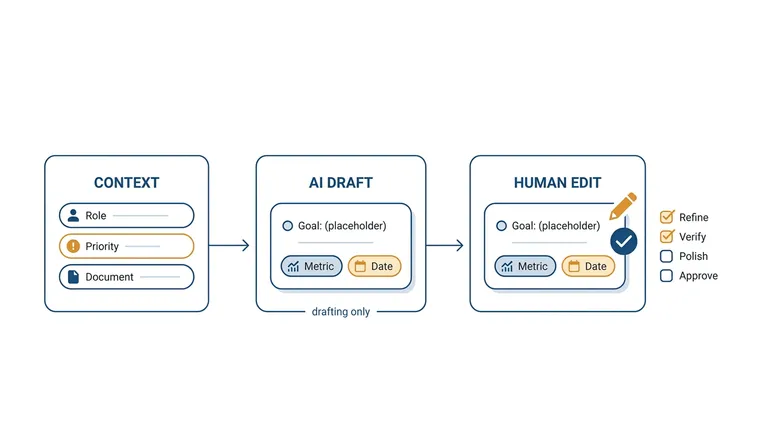
You know the “write this for me” button that shows up in email and documents now? Some work software has the same button for goals.
You type a bit about your job. It hands you back a goal with a number and a date in it. That’s the whole feature.
⚡ In one line: it writes the first draft of your goal. It won’t tell you which goals matter, and it won’t tell you how hard the target should be. Those two parts are still yours.
Most articles about this stop at “click Generate.” Clicking Generate takes two seconds. What you do after it is where things go right or wrong, so that’s what this guide is about.
Before setting an AI-assisted goal, turn it into a concrete task with project-management prompts.
Then give the next task a bounded work session with the focus timer.
What is it, really?
Think of a form letter. Somebody wrote the sentences once, and you just fill in the name and the date. This is the same thing, except the computer writes the sentences and drops your numbers in.
Quick note on the word “goal,” because it sounds vaguer than it is. At work it means one sentence: what you’ll do, by how much, and by when. Like “answer customer emails in 4 hours instead of 9, by the end of December.” Lots of companies ask everyone to write a few of these every three months. Most people put it off and end up staring at an empty box the night before.
That empty box is the only thing this button fixes. Nothing more.
What does it look like when you use it?
Say you look after a small team that answers customer emails. You type in something rough:
I look after 6 people who answer customer emails. We’re too slow. Next three months.
You get back something like:
Cut the average time to first reply on customer emails from 9 hours to 5 hours by 31 December, without adding staff.
Look at what changed. Yours was a complaint. Its version has a number, a finish line and a date. That’s the trade: you bring the situation, it brings the shape.
Now look at what it made up. Nobody told it that 5 hours was possible. It picked that number because it looks like a sensible number, not because it knows anything about your team. Remember that, because it’s the whole reason you can’t just hit save.
Where do you find it?
It’s usually already sitting inside software your company pays for. You don’t buy it separately. Different tools call it different things:
| Tool | What they call it | Where it hides |
|---|---|---|
| SAP SuccessFactors | Assisted Performance Goals | In your goal plan, once an admin turns it on |
| Keka | Generate Goals Using AI | On the goals page; can generate by role or department |
| Betterworks | Goal AI Assist | While you’re creating a goal |
| Totara | AI goal assistant | Asks you three questions first |
| Teamflect | Goal suggestions | Inside a review template |
| Oracle | Goals from a document | After you upload a plan and let it process |
There’s also the free route: paste your situation into ChatGPT, Claude or Gemini and ask for goals. You get the same kind of sentence back. The only difference is that it doesn’t land in your company’s system, so you copy and paste it yourself.
Hang on, what are these tools?
Fair question, because the names mean nothing if you’ve never worked in an HR department.
All of them are the software a company uses to keep track of its staff: who works here, who reports to whom, what everyone’s goals are, and how the yearly review went. None of them is an AI product. The AI button is just a new feature bolted onto software that already existed.
They’re aimed at very different buyers, though, and that matters, because “should we get this” usually turns into “which of these would we end up in.” Prices below were checked on 21 August 2026, and most of these companies won’t print a price at all — you have to ask.
- SAP SuccessFactors — the HR half of SAP, the German software giant that runs the accounting and supply chains of a lot of big companies. Says it has more than 10,000 customers. You end up here because your company already runs SAP for everything else. Sold in modules, price on request, and installing it is a project with consultants, not a sign-up form.
- Oracle Fusion Cloud HCM — the same idea from Oracle. You end up here because your finance system is already Oracle. It also has a package aimed at companies up to about 15,000 staff, with a fixed implementation price, because the full version was too heavy for anyone smaller.
- Betterworks — not a whole HR system. It does one job: goals and performance conversations, and it plugs into whatever HR system you already have. Built for large companies; reviewers put its sweet spot at 500 employees and up, and setting it up takes weeks of guided onboarding, not an afternoon. Price is quoted, not published.
- Keka — an Indian HR and payroll platform, and this is the point of it: Indian salary rules and tax filings are handled properly out of the box. Popular with Indian IT and services companies in the 100–500 staff range. Priced in rupees, roughly ₹10,000–₹16,000 a month for the first 100 people depending on the plan, plus tax, and the goals and reviews part sits in the pricier plan. If you’re not paying Indian salaries, it’s the wrong tool.
- Teamflect — the cheap and cheerful one. It lives entirely inside Microsoft Teams, so if your company already runs on Teams there’s nothing new to log into. Free for up to 10 people with no time limit, then about $7 per person per month. Customers include big names like DHL and Securitas. The catch: no Microsoft account, no Teamflect.
- Totara — from New Zealand, built on open-source code, so you can change it. Sold through local partners rather than by a sales team, which makes it popular with public bodies on tight budgets and strict rules; one UK partner alone lists 69 NHS trusts as users. It started as training software, and the goals and reviews part came later.
Two names you’ll hear that aren’t in the table because I’ve only covered the ones with documented AI goal features: Lattice and 15Five. Both aim at mid-sized companies, roughly 100–1,000 staff, at published prices — Lattice from about $11 per person per month with a $4,000 minimum a year, 15Five from around $4. If your company is that size and doesn’t already own a giant HR system, that’s the shelf you’ll be shopping on.
So the short version of the market: if you work somewhere huge, you get whatever your finance system came with. Somewhere mid-sized, you buy a specialist tool. Somewhere small, you use Teams or a free chatbot and nobody minds. The AI button is roughly the same in all of them. What differs is how much of your own data it can see, which is the next section.
Do you have to pay for it?
Three situations, and it’s worth knowing which one you’re in.
- It’s already paid for. Most often it comes with software your employer already buys. Nothing extra to pay. Somebody just has to switch it on.
- It’s in the pricier plan. AI features often only exist on higher plans. So the real cost isn’t “buy the AI,” it’s “move everyone in the company up a plan.” That can be a big bill for one button.
- You use the free version of a chatbot instead. The free tier of ChatGPT or Gemini does nearly the same job. You lose the part where the goal saves itself into the work system.
Prices for this kind of software are almost never printed on the website; you have to ask for a quote. So ask the company that makes your tool two plain questions: is this included in the plan we’re on, and does it cost more per person. If a sales slide just says “AI included,” ask which plan that means. Don’t guess, and don’t take a number off a blog.
When it’s worth using, and when it isn’t
Use it when:
- You’re staring at an empty box and it’s due tomorrow.
- You’re new to managing and haven’t written goals before.
- You have twenty of these to get through and want a starting draft for each.
- You’re writing in a language you don’t write formally in every day.
Skip it when:
- You’re deciding which things matter this quarter. That’s a judgement call about your team, not a writing job.
- You’re deciding how hard a target should be.
- The goal is about somebody who’s struggling. Write that one yourself.
- You don’t know today’s number yet. Go find that first, or the goal is meaningless.
How to use it, step by step
Menus move around between updates, so check your own tool’s help page too. The details here come from published documentation as of August 2026. The order of the steps is the same everywhere.
Step 1: get it switched on
In SAP SuccessFactors, an admin has to turn it on in AI Services Administration, and each person has to tick an AI notice once before the button shows up. In Teamflect, you turn it on inside a review template rather than for the whole account.
So if you can’t see the button, that’s normal. It’s probably off, or you don’t have permission yet. Ask whoever runs the tool.
Step 2: decide what it’s allowed to see
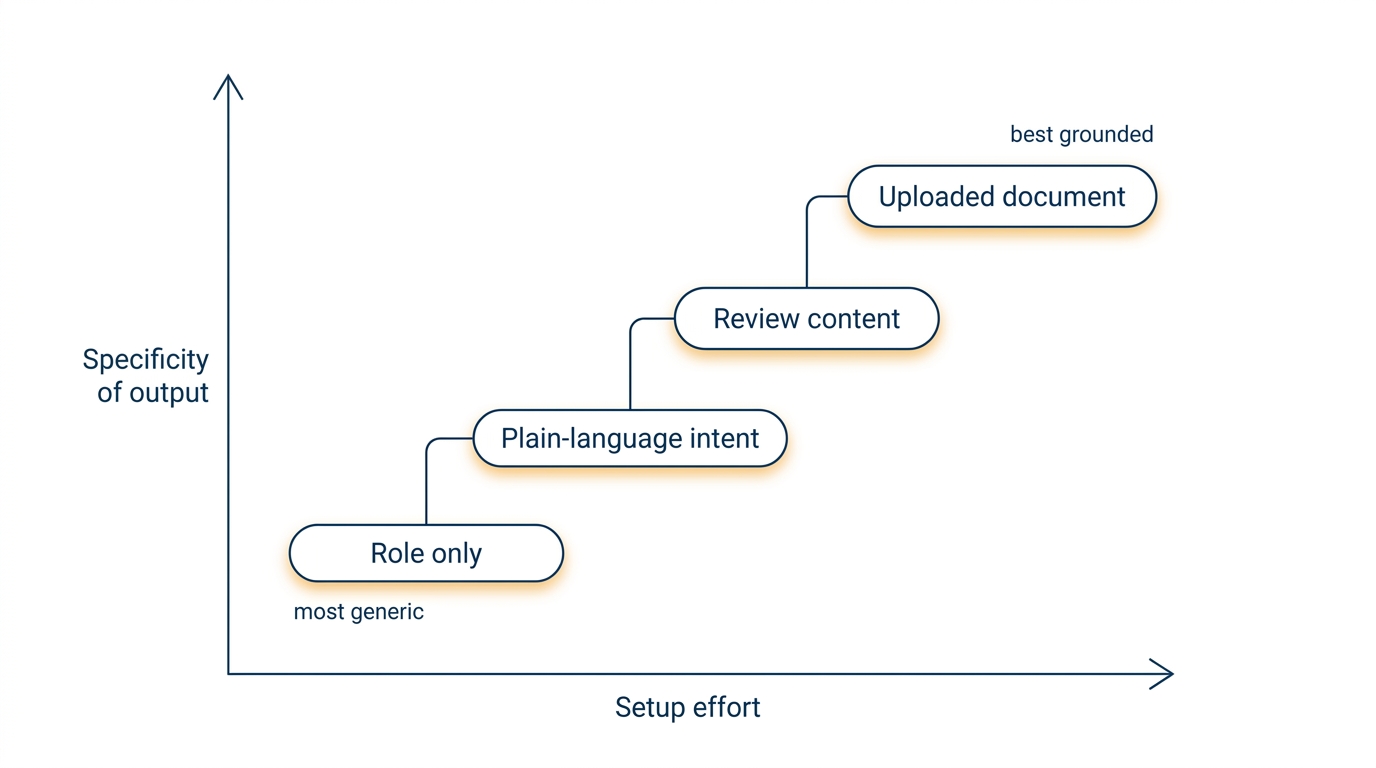
This is the choice that decides whether the draft is useful or useless. The more it knows about your actual situation, the less generic it sounds.
| What you feed it | Example | What you get back |
|---|---|---|
| Just your job title | Keka generating goals by role or department | Fast, and the most generic |
| A few sentences you type | Totara’s three questions | More specific, but you have to type |
| Your review or feedback notes | Teamflect suggesting goals inside a review | Goals tied to what actually happened |
| A document you upload | Oracle reading a business plan attachment | The most relevant, the most setup |
Oracle makes the trade obvious: you have to upload the plan and let the system process it before the AI can use it. That extra step is the price. Something that has read your plan writes a better goal than something that only knows your job title, and there’s no shortcut around that.
Step 3: give it rules, not wishes
If there’s a text box, or you’re using a chatbot instead, what you type decides everything. “Write goals for a support manager” gets you filler. Copy this instead and swap in your own details:
Draft 3 goals for the next three months for a customer support team lead.

My situation:
- 6 people on the team, about 1,400 customer emails a month
- Right now we reply in 9 hours on average
- The company's priority this quarter: stop small customers leaving
- I can't hire anyone and I have no budget for new software

Rules:
- Every goal must use a number we already measure today
- Include today's number as well as the target
- Everything must fit inside these three months
- Nothing that depends on another team finishing something first
- Tell me if a goal uses a number I probably can't check every week

Format: one line per goal, then one line saying why it matters.
Why each rule is in there:
- Giving today’s number stops it inventing a target out of nowhere.
- “A number we already measure” stops goals you have no way to check.
- “Nothing that depends on another team” stops goals that fail for reasons you can’t control.
- Asking it to flag shaky numbers surfaces the problem now instead of in month three.
Step 4: fix the draft before you save it
Four questions, every time:
- Is today’s number in there? “Reply 30% faster” means nothing if nobody wrote down what it is now.
- Can you see it move within a week? If you can’t, you’ll forget about it.
- Is one named person responsible? If two people are, nobody is.
- Could you actually fail at it? If there’s no way to miss, it’s a chore, not a goal.
Keka’s flow is a good habit to copy: generate, edit, set the number, save as a draft, then publish. That draft step is there on purpose. Use it.
Step 5: put a reminder in your calendar
The button writes the goal. It does not remind you about it, chase you, or notice you’ve stopped. Set a repeating reminder to look at the goal. This takes one minute and it’s the difference between a goal and a sentence in a system nobody opens.
Tricks that actually make a difference
- Ask for three versions, then pick. “Give me an easy, a realistic and a stretch version of this goal.” Comparing them is much easier than judging one.
- Make it ask you questions first. Add “before writing anything, ask me up to 5 questions you need answered.” The draft comes out far better.
- Ask what could go wrong. “For each goal, what would make me miss it?” That list is more useful than the goals.
- Feed it last quarter’s goals. “Here’s what I set last time and what happened. Write this quarter’s.”
- Ban the sales words. “No words like leverage, drive, optimise, enhance. Write it like I’d say it to my team.”
- Test the built-in one against a free chatbot. Same input, both tools, compare. Sometimes the built-in one is genuinely connected to your data. Sometimes it’s a template with a prompt behind it.
Does it actually work?
Hardly anyone writes this bit honestly. The companies selling these tools publish numbers like “saves 50% of the time.” Nobody publishes a fair test. There are a few real studies, and they’re smaller and less exciting than the sales pitch.
| What was found | What the study did | Source | The catch |
|---|---|---|---|
| People with AI help made more progress than people with no help | 517 working adults, split into 3 groups at random; the gap was small-to-medium | arXiv preprint, March 2026 | Not checked by other researchers yet |
| Same study: AI help was no better than answering a few good questions on paper | The AI group and the paper group came out about level | arXiv preprint | Same catch |
| AI coaching made no measurable difference; a human coach did | 114 people, assigned at random | Human Resource Development International | About coaching, not goal writing |
| Hitting 70% of an ambitious goal counts as a win | Google’s own published guidance | Google re:Work | A common habit, not a study |
Read the first two rows together, because that’s the real finding: AI help beat doing nothing, and it did not beat sitting down with a pen and answering a few good questions.
The researchers’ explanation isn’t that the AI wrote smarter goals. It’s that writing a goal down and handing it to something made people feel a bit watched, and feeling watched makes people follow through.
So if this helps you, it probably helped by making you think in a structure. Not because it knows anything about your job.
One more number gets passed around a lot: that teams using AI for both writing and checking goals give up on off-track goals far less often. It comes from a single company’s blog post, with no sample size and no other source, so it’s left out here. If a claim has one source and no sample size, treat it as an advert.
Why everyone ends up with the same goals
Here’s the problem nobody’s help page warns you about.
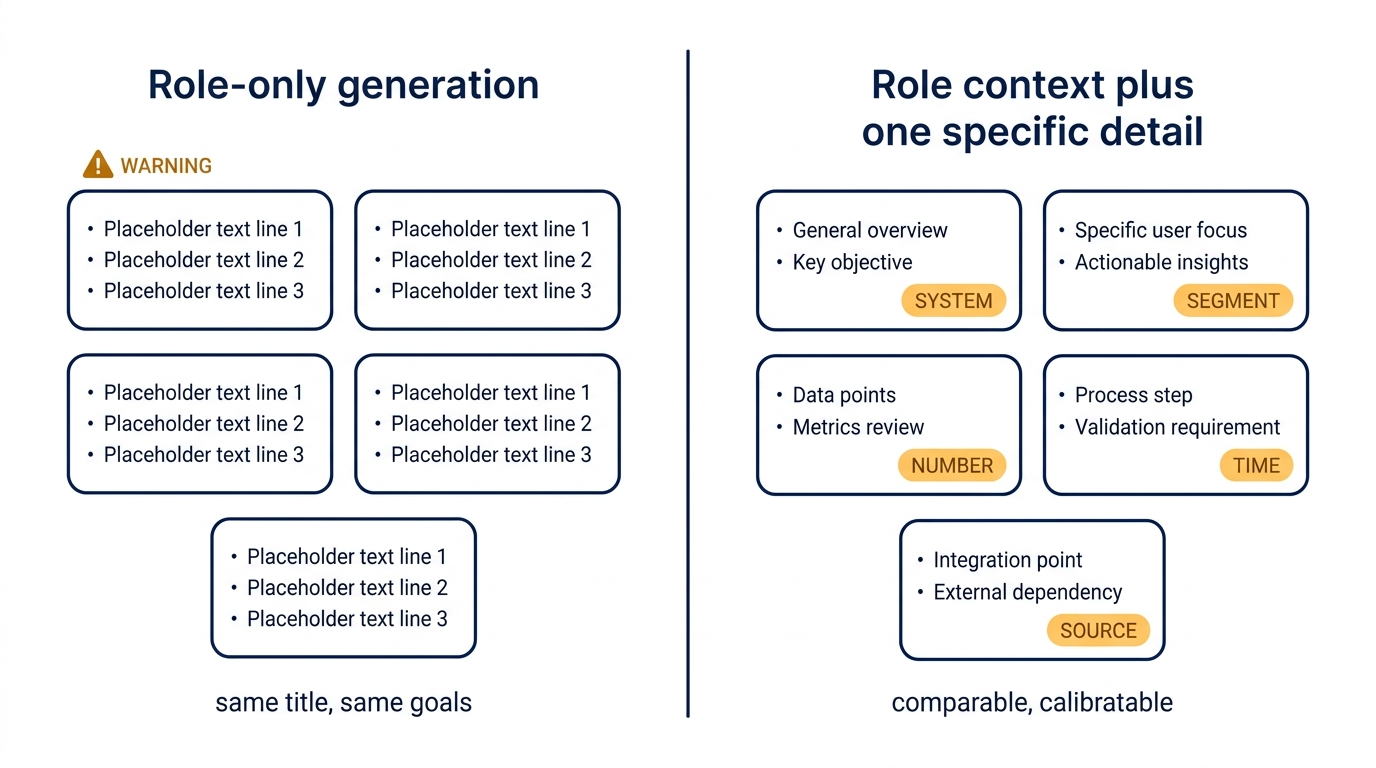
When a tool writes goals by job title — the fastest setting, and the one people use — everyone with the same title gets almost the same goals. Do that across a company and you get goals that are tidy, well written and identical. Nobody’s goals mention what they’re actually working on.
Then review season arrives and you can’t compare two people, because their goals said the same thing.
The fix is boring and it works: the job title is the starting point, not the answer. Every goal has to be edited to include one detail that could only be true for this person, this quarter — a particular system, a particular group of customers, a particular number. Make that a written rule when you switch the feature on, or people will just accept whatever appeared on screen.
Two questions to ask before your whole company uses it
Goals written by AI don’t stay on the goals screen. They get copied into reviews, then into ratings, then into decisions about promotions and pay. Once they’re on that path, the law can get involved.
New York City has a rule called Local Law 144. It covers software that largely makes or replaces a human decision about someone’s job. Lawyers who work on this say it covers not just hiring but promotions and performance reviews as well. If it applies to you, you owe an independent check for bias every year, and you have to tell the people being assessed. Other places are writing similar rules.
Something that only writes a draft goal probably isn’t covered on its own. Something that writes the goal, has another AI score it, then feeds that score into a rating starts to look a lot like it is. So before your whole company starts using it, get two answers in writing from the company that makes the tool:
- Is our staff’s data used to train your AI? Betterworks, for example, states plainly that employee data isn’t used to train its models. Get the same sentence for your tool, in writing, plus a list of any other companies that touch the data.
- Where does the text go after the goals screen? Ask which other features read it: review summaries, ratings, scoring. That answer, not the goals page, is what decides whether the law applies to you.
You don’t want to be answering these for the first time in a meeting with your legal team or your staff representatives.
If both sides use AI, what’s the point?
People ask this constantly. The employee gets AI to write the goals, the manager gets AI to write the feedback, so what’s actually happening?
Fair question. The value of goal setting was never the writing. It was two people sitting down, agreeing on what matters, and feeling on the hook for it. AI makes the writing faster. It can’t make the agreement faster.
So the test isn’t how many people used the button. It’s whether the time you saved on typing went back into the conversation, or just vanished. If goal season got faster and quieter and nobody talked more, things got worse while every chart looked better.
Mistakes people make
- Accepting a batch of goals without reading them. Speed is the bug here, not the feature.
- Leaving out today’s number. “30% faster” from an unknown starting point can’t be judged at the end.
- Letting it decide how hard the target is. It has no idea what’s hard for your team.
- Writing the goal and never looking at it again. Nothing here follows up for you.
- Assuming the built-in AI is better than a free chatbot. Test both with the same input.
- Letting the whole company loose on it before anyone asks where the data goes.
FAQ
Do I have to edit what it writes?
Yes, every time. Treat it as a rough draft. At the very least: add today’s number, check you can actually measure it, and add one detail that’s specific to this person.
Is the built-in one better than just using ChatGPT?
Only if it can see your own information — your role, your reviews, a plan you uploaded — and saves the goal into the system you already use. If it does neither, a free chatbot with a good prompt does about the same job.
Does it cost extra?
Usually it comes with software your employer already pays for, but AI features often sit on the pricier plans. Ask whether it’s in your current plan and whether it adds a per-person charge. Prices are rarely published.
Does it actually make people perform better?
The best study so far, with 517 people, found it beat getting no help at all but did no better than answering a few good questions on paper. Treat it as a writing aid.
Will our staff’s data be used to train the AI?
Depends on the company that makes the tool. Some say outright that it isn’t. Ask for that in writing before everyone starts using it.
Can this get us into legal trouble?
Indirectly. Once AI-written text feeds into promotion or pay decisions, rules like New York City’s Local Law 144 can apply, which means a yearly bias check and telling staff about it.
Should the manager or the employee use it?
Best case: the employee drafts, the manager edits. Worst case: a manager generates goals for the whole team in one go. That’s the fastest way to end up with twelve identical goals.
What to do next
- Check whether the button already exists in your tool and is simply switched off.
- Try it with one team for one round. Don’t launch it everywhere at once.
- Make two things compulsory on every generated goal: today’s number, and one detail specific to that person.
- Get the two written answers above before anyone else uses it.
- At the end of the round, ask one question: did we talk about goals more, or just type them faster?
The button is worth using. It’s worth exactly one thing: a faster first draft. Anything that promises more than that is selling you something.