🎯 Short answer: a multi-agent system is one AI that plans the work and hands pieces of it to other AIs, each with its own clean workspace. It shines on big, splittable jobs like research. It costs a lot more, so start with one prompt and add agents only when the simple version stops working.
If you have heard people talk about “subagents,” “orchestrators,” or “agent teams” and nodded along without really getting it, this guide is for you. It pulls together four pieces Anthropic published on the topic: two engineering articles (how they built Claude’s Research feature and Building effective agents) and two Claude Code tutorials (custom subagents and agent teams).
By the end you will know what these words mean, why splitting work across AIs helps, what it costs, and how to set up your first subagent and your first agent team.
1. What an AI agent actually is
Start with a plain large language model (LLM), the kind of AI behind ChatGPT or Claude. On its own, it reads text and writes text. Give it extra abilities, such as searching the web, calling tools, or remembering things, and Anthropic calls it an augmented LLM. That is the basic building block of everything below.
1.1 Workflow or agent: who decides the next step?
Anthropic splits AI systems that use tools into two kinds:
- Workflow: you, the developer, write the steps in code. The AI fills in each step, but the path is fixed. For example: “Write a draft → check it → translate it.”
- Agent: the AI decides its own next step. It looks at the result of each action, then chooses what to do next, in a loop, until the job is done.
A simple way to picture it: a workflow is a recipe card. An agent is a cook who tastes the soup and adjusts as they go.
1.2 Start with the simplest thing that works
This is the advice Anthropic repeats most. Agentic systems usually trade speed and money for better results, and that trade isn’t always worth it. For many apps, one well-written prompt with some examples and the right reference material is enough.
Anthropic also suggests calling the model API directly before reaching for a framework. Frameworks save setup time, but they hide the actual prompts and responses, which makes bugs harder to find.
2. Five patterns to learn before building a multi-agent system
Before you jump to many agents, it helps to know the five common ways to connect AI calls. Most real systems are a mix of these.
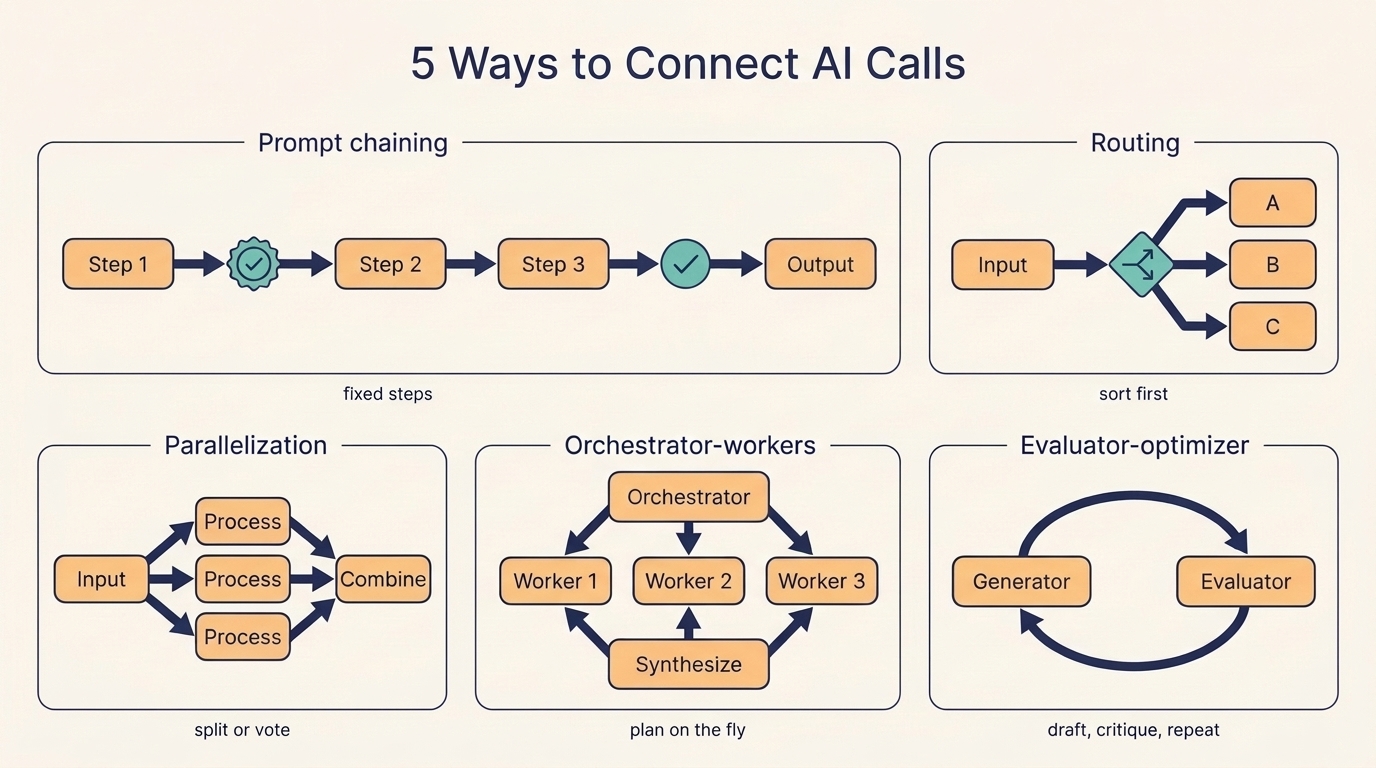
Five ways to connect AI calls: prompt chaining, routing, parallelization, orchestrator-workers, and evaluator-optimizer.
| Pattern | How it works | Use it when | Example |
|---|---|---|---|
| Prompt chaining | Step 2 uses the output of step 1, and so on. You can add checks between steps. | The task breaks cleanly into fixed steps | Write marketing copy, then translate it |
| Routing | First sort the input, then send it to a specialized prompt or model | Inputs fall into clear categories | Refund requests go one way, tech support another; easy questions go to a cheaper model |
| Parallelization | Run several calls at once. Sectioning splits the task; voting runs the same task several times | Parts are independent, or you want several opinions | One call answers the user while another screens for unsafe content |
| Orchestrator-workers | A lead AI breaks the task down on the fly, hands parts to worker AIs, then combines the results | You can’t know the subtasks in advance | A coding change whose files depend on the request |
| Evaluator-optimizer | One AI writes, another critiques, repeat | You have clear quality criteria | Literary translation that needs several rounds of polish |
Multi-agent systems are mostly the orchestrator-workers pattern with real agents as the workers. The next section shows what that looks like in production.
3. How Anthropic’s research system splits up the work
Claude’s Research feature answers hard questions by searching the web and connected apps. Anthropic built it as a multi-agent system, and the write-up is one of the clearest real-world examples available.
3.1 One lead, many researchers
When you ask a question, a lead agent reads it, makes a plan, and saves that plan to memory. Saving it matters: if the conversation grows past 200,000 tokens, older text gets cut, and the plan would be lost.
The lead then creates several subagents. Each one gets a slice of the question, searches on its own, and sends back a short summary. The lead reads those summaries and decides whether it needs another round. When it has enough, a separate citation agent goes through the report and attaches sources to each claim.
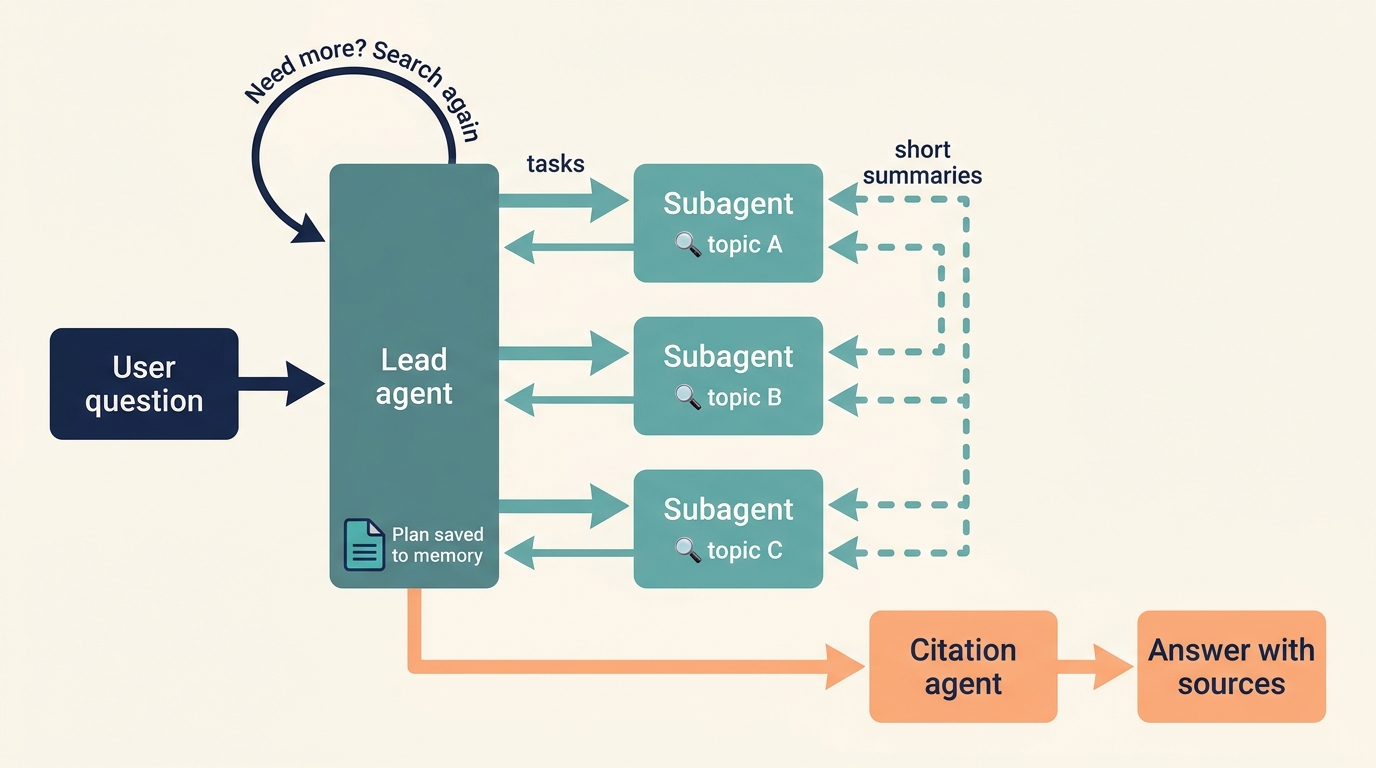
A user question goes to the lead agent, which sends tasks to subagents, collects their summaries, loops if needed, then passes everything to a citation agent.
Think of a newsroom. The editor assigns three reporters to three angles of a story. Each reporter works their own leads, then files a few paragraphs. The editor writes the final piece, and a fact-checker adds the citations.
3.2 Why more agents gave better answers
Each subagent has its own context window, which is the AI’s short-term memory for one task. A subagent can read dozens of pages, keep only what matters, and hand the lead a compact summary. The lead’s memory stays clean, and more ground gets covered.
The numbers from Anthropic’s internal tests:
- A system with Claude Opus 4 as lead and Claude Sonnet 4 subagents scored 90.2% higher than Claude Opus 4 working alone on their research evaluation.
- In one example, the task was to find the board members of every IT company in the S&P 500. The multi-agent system split the list among subagents and got it right. The single agent searched one company at a time and failed.
- On the BrowseComp benchmark, token usage alone explained 80% of the difference in performance. Simply put, the system did better largely because it could afford to read and think more, spread across many workers.
3.3 The catch: about 15 times the tokens
⚠️ Cost warning: in Anthropic’s data, a single agent uses about 4× the tokens of a normal chat, and a multi-agent system uses about 15×. Use it for tasks where the answer is worth that price.
Multi-agent setups also struggle when every agent needs the same context, or when pieces depend heavily on each other. Anthropic points out that most coding tasks have fewer truly independent parts than research does, so they gain less from splitting.
3.4 Six lessons from building it
Early versions made rookie mistakes, like spawning 50 subagents for a simple question or searching forever for sources that didn’t exist. These are the fixes that worked.
1) Give every helper a real job brief
“Research the semiconductor shortage” was too vague. Subagents misread it, and two of them ran the same searches. Each subagent needs four things: a goal, an output format, which tools and sources to use, and where its task ends.
2) Match the effort to the question
Anthropic wrote rough budgets into the lead agent’s prompt:
| Question type | Agents | Tool calls |
|---|---|---|
| Simple fact lookup | 1 | 3–10 |
| Direct comparison | 2–4 subagents | 10–15 each |
| Complex research | 10+ subagents | Clearly divided |
3) Search wide, then narrow
Agents liked long, overly specific searches that returned almost nothing. Telling them to start with short, broad queries, see what exists, and then zoom in worked much better. That’s how a good human researcher works too.
4) Treat tool descriptions like instructions
An agent searching the web for information that only lives in Slack will never find it. Each tool needs one clear purpose and a clear description. Anthropic even had an agent test a broken tool dozens of times and rewrite its description; agents using the new description finished tasks 40% faster.
5) Run things in parallel
The lead now starts 3–5 subagents at once, and each subagent runs 3 or more tool calls at once. For complex questions, this cut research time by up to 90%.
6) Test early with a small set
The team started with about 20 real questions. When the system is young, one prompt change can move the success rate from 30% to 80%, so a small test set is enough to see it. They also used an AI judge with a scoring rubric (accuracy, citations, completeness, source quality, tool efficiency), plus human testers. The humans caught something the scores missed: agents kept picking SEO content farms over better sources like academic PDFs.
4. Hands-on: create your first subagent in Claude Code
Claude Code is Anthropic’s coding assistant that runs in your terminal. It lets you use the same lead-and-helper idea in your own projects.
4.1 What a subagent does for you
A subagent is a helper AI with its own context window, its own instructions (a system prompt), its own allowed tools, and its own permissions. When a task matches a subagent’s description, Claude hands the task to it. The subagent works on its own and returns only the summary.
That solves a very common problem. Searching a codebase or reading logs fills your main conversation with text you’ll never look at again. A subagent keeps that mess in its own window.
Claude Code already ships with a few built-in subagents:
- Explore: read-only, fast, for searching and understanding a codebase
- Plan: read-only, gathers context while you are in plan mode
- General-purpose: for multi-step tasks that need both reading and editing
4.2 Build a code reviewer in three steps
A subagent is just a Markdown file with a small settings header (called YAML frontmatter). You can write it by hand or let Claude write it for you.
1) Ask Claude to write the file
In Claude Code, type something like this:
Create a personal code-improver subagent in ~/.claude/agents/ that scans
files and suggests improvements for readability, performance, and best
practices. It should explain each issue, show the current code, and
provide an improved version. Make it read-only and have it use Sonnet.
2) Check the file
Open ~/.claude/agents/code-improver.md. It should look roughly like this:
---
name: code-improver
description: Scans files and suggests improvements for readability, performance, and best practices. Use after writing or modifying code.
tools: Read, Grep, Glob
model: sonnet
---

You are a code improvement specialist. For each issue you find, explain
the problem, show the current code, and provide an improved version.
Here is what each line does:
name: the subagent’s IDdescription: tells Claude when to use it. Write this one carefully.tools: what it is allowed to touch.Read, Grep, Globmeans it can look but can’t edit.model: which Claude model it runs on- Everything below the second
---: the subagent’s instructions
3) Use it
Use the code-improver agent to suggest improvements in this projectIn the transcript you’ll see a line like code-improver(Suggest code improvements). That’s your subagent at work. If Claude can’t find it, restart Claude Code; this only happens when the ~/.claude/agents/ folder didn’t exist before the session started.
4.3 Where to save subagent files
| Location | Who can use it |
|---|---|
.claude/agents/ in your project | Everyone working on that project. Commit it to Git so your team shares it. |
~/.claude/agents/ | Only you, in every project on your machine |
--agents flag when starting Claude Code | Only the current session. Handy for quick tests. |
4.4 Tips for good subagents
💡 Keep descriptions short, put details in the instructions. All subagent descriptions load into Claude’s memory every session; the full instructions load only when that subagent runs. Claude Code warns you when your combined descriptions pass 15,000 tokens.
- Limit tools. A reviewer that can only read can’t accidentally break anything.
- Use cheaper models for simple jobs. Routing file searches to a smaller model like Haiku saves money.
- Make one subagent per repeated job. If you keep giving Claude the same instructions for the same kind of task, that’s a sign you need a subagent.
5. Hands-on: run an agent team in Claude Code
Subagents report back and stop there. Sometimes you want helpers that can also talk to each other, argue, and pick up tasks on their own. That’s what agent teams are for.
5.1 How a team works compared with subagents
An agent team has four parts: a team lead (your main session), teammates (separate Claude Code sessions), a shared task list, and a mailbox for messages between agents. You can also message any teammate directly.
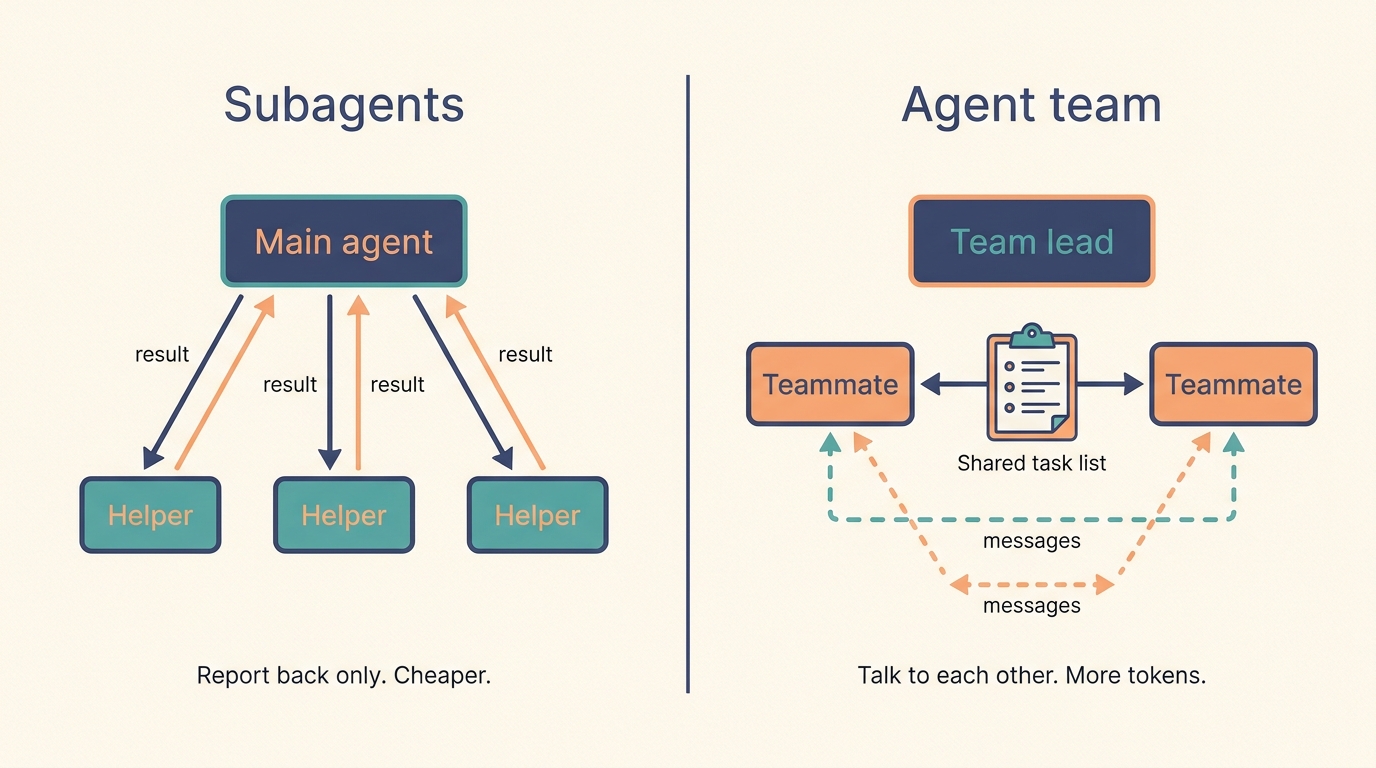
Subagents only report results back to the main agent. In an agent team, teammates share a task list and message each other directly.
| Subagents | Agent team | |
|---|---|---|
| Communication | Report results to the main agent | Teammates message each other directly |
| Who coordinates | The main agent manages everything | Teammates self-organize through messages and a shared task list |
| Best for | Focused jobs where only the result matters | Work that needs discussion and pushback |
| Token cost | Lower | Higher; every teammate is a full Claude session |
5.2 Turn it on
Agent teams are experimental and off by default. To enable them, add this to your settings.json:
{
  "env": {
    "CLAUDE_CODE_EXPERIMENTAL_AGENT_TEAMS": "1"
  }
}
Teams only form in an interactive session. Running Claude Code with the -p flag won’t create teammates.
5.3 Start your first team
Describe the job and the roles in plain English. This example from the docs works well because the three roles don’t need to wait on each other:
I'm designing a CLI tool that helps developers track TODO comments across
their codebase. Spawn three teammates to explore this from different angles:
one on UX, one on technical architecture, one playing devil's advocate.
Claude fills the shared task list, creates the teammates, and combines their findings at the end. In the agent panel below your prompt, use the arrow keys to pick a teammate and press Enter to read or message it. Press Ctrl+T to show the task list.
Tasks move through three states: pending, in progress, and completed. A teammate who finishes can grab the next open task by itself.
5.4 Rules that keep a team from tripping over itself
✅ Team checklist
Start with 3–5 teammates. Three focused teammates often beat five scattered ones.
Aim for 5–6 tasks per teammate, each with a clear deliverable like one function, one test file, or one review.
Put the context in the spawn prompt. Teammates load your project files and settings, but they don’t see the lead’s chat history.
One owner per file. Two teammates editing the same file will overwrite each other.
Begin with research or review tasks, such as reviewing a pull request or investigating a bug, before trying parallel coding.
Check in often. If the lead starts doing the work itself, tell it: “Wait for your teammates to complete their tasks before proceeding.”
5.5 Current limits
Because the feature is still experimental, expect some rough edges. Each session can run only one team. Teammates can’t create their own teammates. Shutting a teammate down can take a moment, since it finishes its current step first. And token use grows with every active teammate, so keep teams for work that is worth it.
6. Which setup should you pick?
Run through these questions in order and stop at the first one that fits.
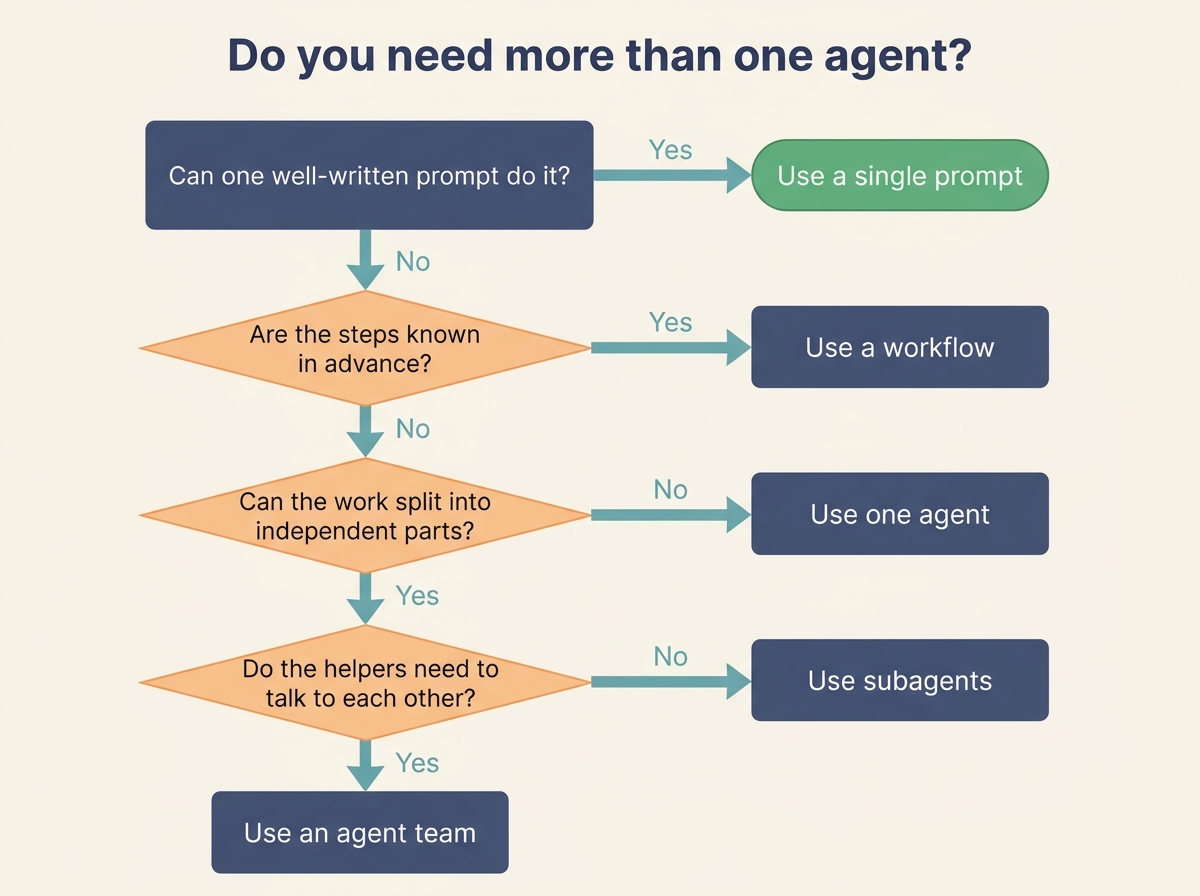
A five-question flowchart for choosing between a single prompt, a workflow, one agent, subagents, and an agent team.
A quick example of each:
- Single prompt: summarizing one article
- Workflow: writing a product description, checking it against brand rules, then translating it
- One agent: fixing a bug that touches a few related files
- Subagents: researching five competitors at the same time, each returning a short summary
- Agent team: reviewing a pull request from three angles, security, performance, and test coverage, where reviewers flag issues to each other
Anthropic’s own summary of good agent design comes down to three habits: keep the design simple, make the agent’s plan visible, and put real effort into tool descriptions and testing. Start small, measure whether the extra agents actually improve results, and scale up only when they do.
If you’re still deciding whether you need an agent at all, start with personal AI agent vs chatbot. Once a subagent or team hands back code, how to review AI-generated code in Claude Code shows what to check before you merge. For faster work in the terminal, keep Claude Code terminal keyboard shortcuts nearby.
Sources
- Anthropic, How we built our multi-agent research system (June 2025)
- Anthropic, Building effective agents (December 2024)
- Claude Code Docs, Create custom subagents
- Claude Code Docs, Orchestrate teams of Claude Code sessions