Codex skills package a repeatable job into a folder containing a SKILL.md file. Use one when you keep giving the same procedure, such as running a project’s checks and reporting failures. Start with a small skill you can inspect, invoke it explicitly, and compare its report with the actual command output. A skill makes instructions reusable; it does not guarantee correct execution or grant extra permissions. This guide creates a shipping-test skill, runs it against a failing example, and runs it again after the code is corrected. It also explains where to install skills and how to prevent unwanted triggering.
Choose a skill or project instructions
Put standing project rules in AGENTS.md: the test command, important folders, or a rule about preserving test expectations. Put a named procedure in a skill: inspect the shipping calculation, run its tests, and return a particular report. A one-off request belongs in the conversation.
| What you need | Use | Example |
|---|---|---|
| A rule for work throughout a project | AGENTS.md | Keep the existing test expectations |
| A repeatable, named procedure | Skill | Run and summarize shipping tests |
| Access to an external tool | MCP connection | Look up a product record |
| A distributable collection | Plugin | Package skills and tool connections |
On a phone, swipe sideways to read the last column.
A skill can include scripts and reference files, but a short instruction file is enough for our example. Avoid adding code merely to make the folder look complete. If a script is needed, read it before running the skill.
Install a skill you can inspect
For a skill used only in one project, place its folder in .agents/skills/ inside that project. For example:
cedar/
  .agents/
    skills/
      cedar-check/
        SKILL.md
  shipping.py
  test_shipping.py
For a personal skill available across projects, the current documented location is ~/.agents/skills/. The ~ means your user folder. Current Codex also discovers project skills while walking from the working directory toward the repository root. See the official skills guide for the complete scope list and client support.
To install an existing skill manually:
- Open its source folder and read
SKILL.md. - Check any referenced scripts, downloads, accounts, and commands.
- Copy that one skill folder into the intended
.agents/skills/directory. - Start a new Codex session in the project.
- Use
/skillsor type$to find the skill, then run a harmless example.
A page calling itself a skill catalog is not proof that every entry is trustworthy or current. Prefer sources you can inspect, such as the OpenAI skills repository. Check the specific skill’s requirements before copying it. If you want a package others can install and update, use a plugin.
Create a small project skill
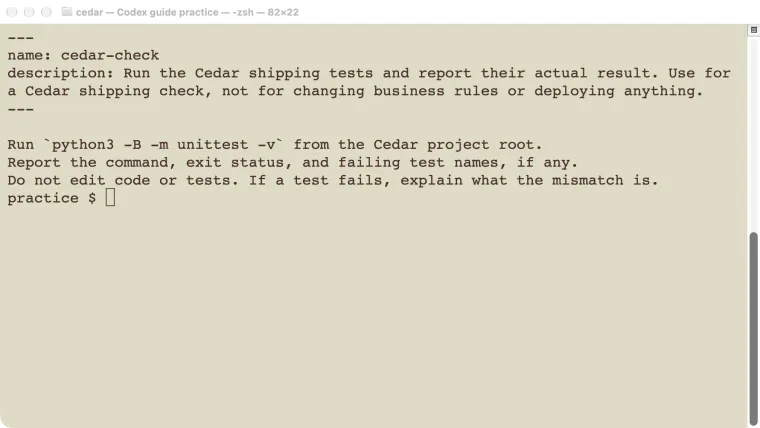
Save this as .agents/skills/cedar-check/SKILL.md:
---
name: cedar-check
description: Run the Cedar shipping tests and report their actual result. Use for a Cedar shipping check, not for changing business rules or deploying anything.
---

Run `python3 -B -m unittest -v` from the Cedar project root.
Report the command, exit status, and failing test names, if any.
Do not edit code or tests. If a test fails, explain what the mismatch is.
The two fields at the top identify the skill and explain when to use it. The body states the procedure and its limits. -B tells Python not to create bytecode cache files; it does not change what the tests assert.
For a separate practice folder, this deliberately incorrect shipping.py is enough:
def shipping_cost(subtotal):
    if subtotal < 0:
        raise ValueError("subtotal cannot be negative")
    return 0 if subtotal > 50 else 5
Save the checks as test_shipping.py:
import unittest
from shipping import shipping_cost

class ShippingTests(unittest.TestCase):
    def test_below_threshold(self):
        self.assertEqual(shipping_cost(49), 5)
    def test_boundary(self):
        self.assertEqual(shipping_cost(50), 0)
    def test_above_threshold(self):
        self.assertEqual(shipping_cost(51), 0)
    def test_negative(self):
        with self.assertRaises(ValueError):
            shipping_cost(-1)

if __name__ == "__main__":
    unittest.main()
The intended rule is free shipping at $50 or more. The first implementation accidentally excludes exactly $50. These are fictional practice values, not a store policy.
Test failure and success
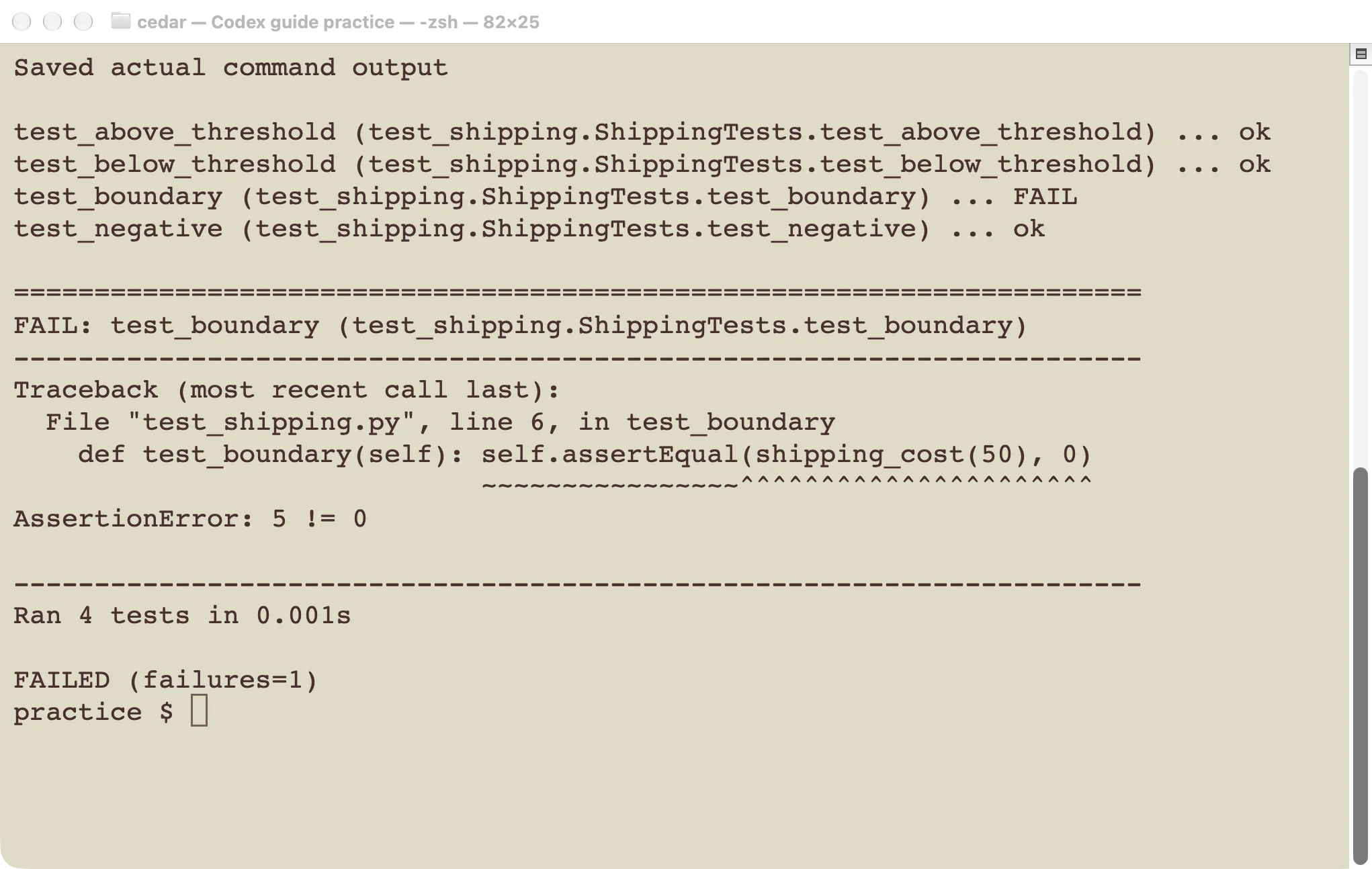
The failure is useful evidence. A skill that reports it accurately is doing its job.
Open Codex in the practice folder and enter:
Use $cedar-check to check this project. Follow the skill exactly.
Respond in English. Do not edit any file.
Our local test used Codex CLI 0.146.0 on macOS. Its execution record contained the real python3 -B -m unittest -v command, exit status 1, and one failing test: test_boundary. The agent reported the mismatch between actual 5 and expected 0. It did not repair the code or change the assertions.
Now manually change only > to >= in shipping.py and repeat the same request in a fresh session.
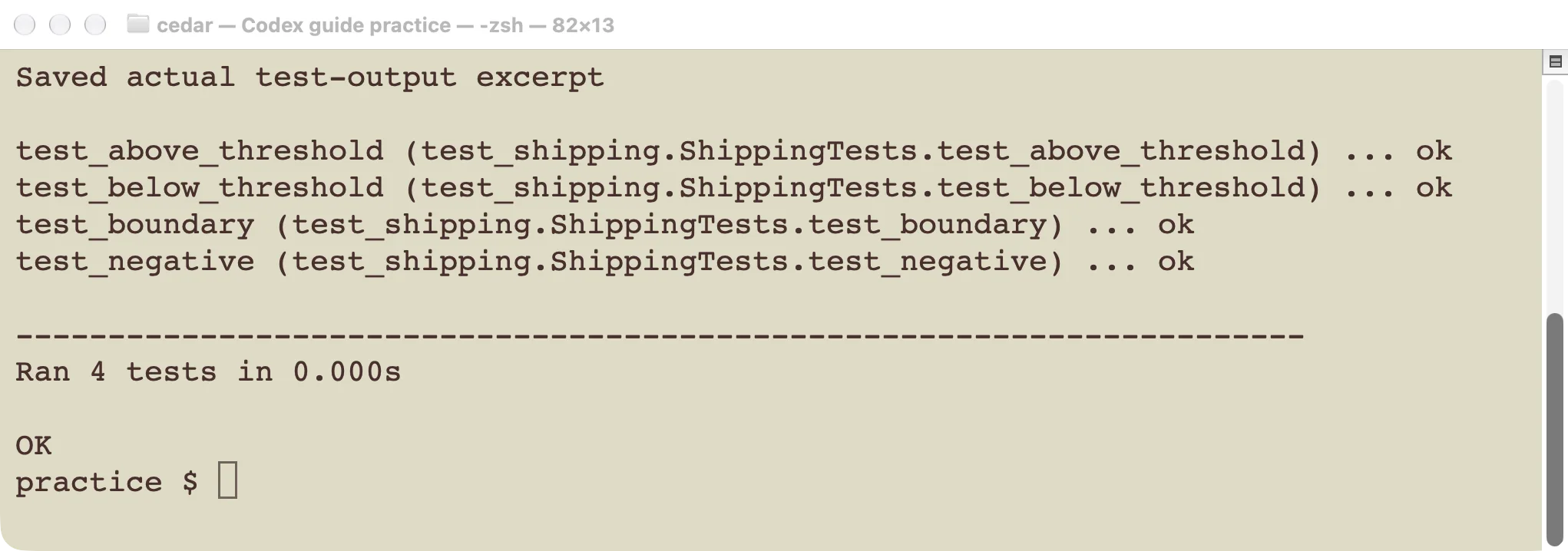
The second run used the same four checks after the one-character logic correction.
The second execution returned status 0, and all four tests passed. The useful acceptance check is the command result and unchanged expectations, not a reassuring sentence from the agent. If it claims success without running the command, treat that as a failed workflow test.
This experiment verifies a local CLI skill. It does not establish that every desktop, IDE, or hosted environment will discover the same folder or have Python installed.
Control when the skill runs
Codex normally sees a skill’s name and description before loading its full instructions. Make the description specific enough to distinguish the procedure from nearby work. “Help with code” provides little useful selection guidance.
For a skill you want to invoke only by name, add .agents/skills/cedar-check/agents/openai.yaml:
policy:
  allow_implicit_invocation: false
This setting keeps the example explicit. It does not expand tool permissions.
We used this setting in the successful explicit-invocation test. For automatic selection, test both a matching request and an unrelated request. Record whether the skill ran in each case. Do not claim that a carefully worded description alone proves the boundary works.
Skills still operate within the session’s permissions. A test procedure does not authorize deployment, account access, or edits it expressly excludes.
Maintain and troubleshoot your skill
If the skill is missing, check the actual working directory, the .agents/skills/<name>/SKILL.md nesting, and the required name and description fields. Start a new session after installation. A similarly named folder elsewhere is not proof this project loaded it.
If the wrong skill runs, narrow its description and use explicit selection while diagnosing. Same-name skills from different locations are not a reliable way to combine instructions; give distinct procedures distinct names.
If the skill runs but its command fails, inspect the environment. A missing Python executable is different from a failed shipping assertion. Preserve the error, correct the relevant cause, and rerun the same checks.
Keep the skill beside the project when teammates need the same procedure. Review it when commands or business rules change. Store useful reference material separately and link it from the skill, instead of growing a long instruction file that repeats the entire project manual.
Next step: run the small failing example, confirm the skill reports the failure honestly, then confirm the corrected example passes. Only then adapt the procedure to a real recurring task.