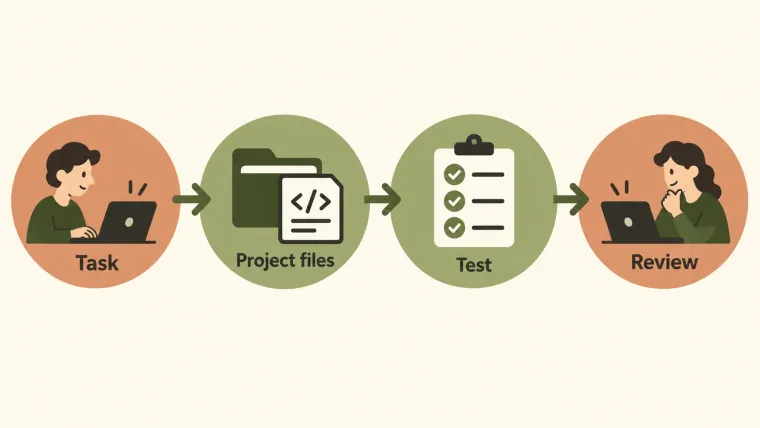
Codex is OpenAI’s coding agent: you describe what you want to accomplish, and it can inspect a project, edit files, run commands, and help review the result. That makes it useful for work such as investigating a bug, adding a small feature, or understanding an unfamiliar repository. You can use it through a terminal, an editor, a desktop app, or a cloud environment. The choice changes where the work happens and how you follow it. You still need to check the changes and confirm that they solve the original problem. OpenAI’s developer overview describes these workflows.
What Codex can do with your project
A coding task usually involves more than producing a snippet. The agent needs the surrounding files, the rules of the project, and a way to check the outcome. In the CLI, Codex can work with files and development tools in your local repository, subject to the permissions available to that session. Codex CLI documentation.
| Task | A useful request | What you should inspect |
|---|---|---|
| Understand unfamiliar code | Explain how a request reaches this handler; name the files involved. | Whether the explanation matches the actual call path. |
| Fix a reproducible bug | Reproduce this failing test, fix the cause, and rerun it. | The failure before the edit, the diff, and the result afterward. |
| Add a small feature | Add this validation rule while preserving the existing error format. | The new behavior and existing behavior that must remain. |
| Review a change | Inspect this diff for correctness problems and explain each finding. | Whether each finding is supported by the code and its context. |
| Improve documentation | Update the setup instructions to match the current configuration. | Whether someone can follow the instructions successfully. |
This table is a task-selection aid, not a claim that every attempt will succeed. A narrow request with a visible outcome is easier to judge than “make this application better.”
CLI, editor, desktop, and cloud: choose where the work runs
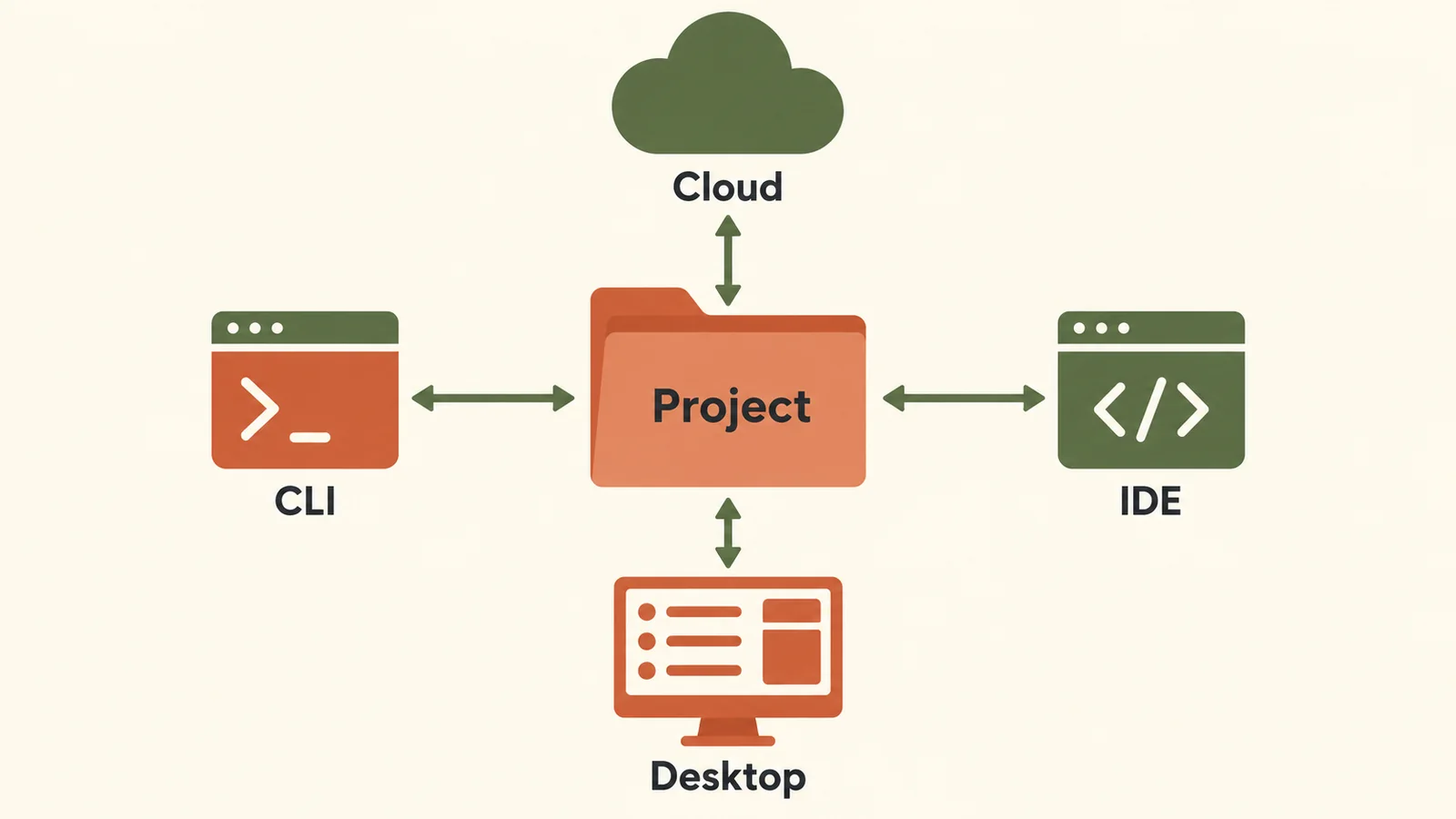
Codex offers several entry points; configure the environment used by the task.
The product has several entry points. You do not need to adopt all of them to start.
| Entry point | Use it when | Decide before starting |
|---|---|---|
| CLI | You already work in a terminal and want Codex beside your project commands. | Which project directory it should use. |
| IDE extension | You want to work beside files in your editor. | Which folder or workspace is open. |
| Desktop app | You want a visual place to manage projects and longer tasks. | Whether this task should use a local or remote environment. |
| Cloud | You want to delegate work in a configured remote environment. | Whether the repository, dependencies, and required tools are available there. |
A task running in the cloud does not automatically have every uncommitted file or local dependency on your laptop. Check the environment that will actually run the work. OpenAI documents the available surfaces in its CLI overview and describes remote setup in Codex Cloud.
For installation, use the installation guide. This page explains which entry point fits your task; it does not attempt to cover every setup screen.
A concrete example: fixing one boundary condition
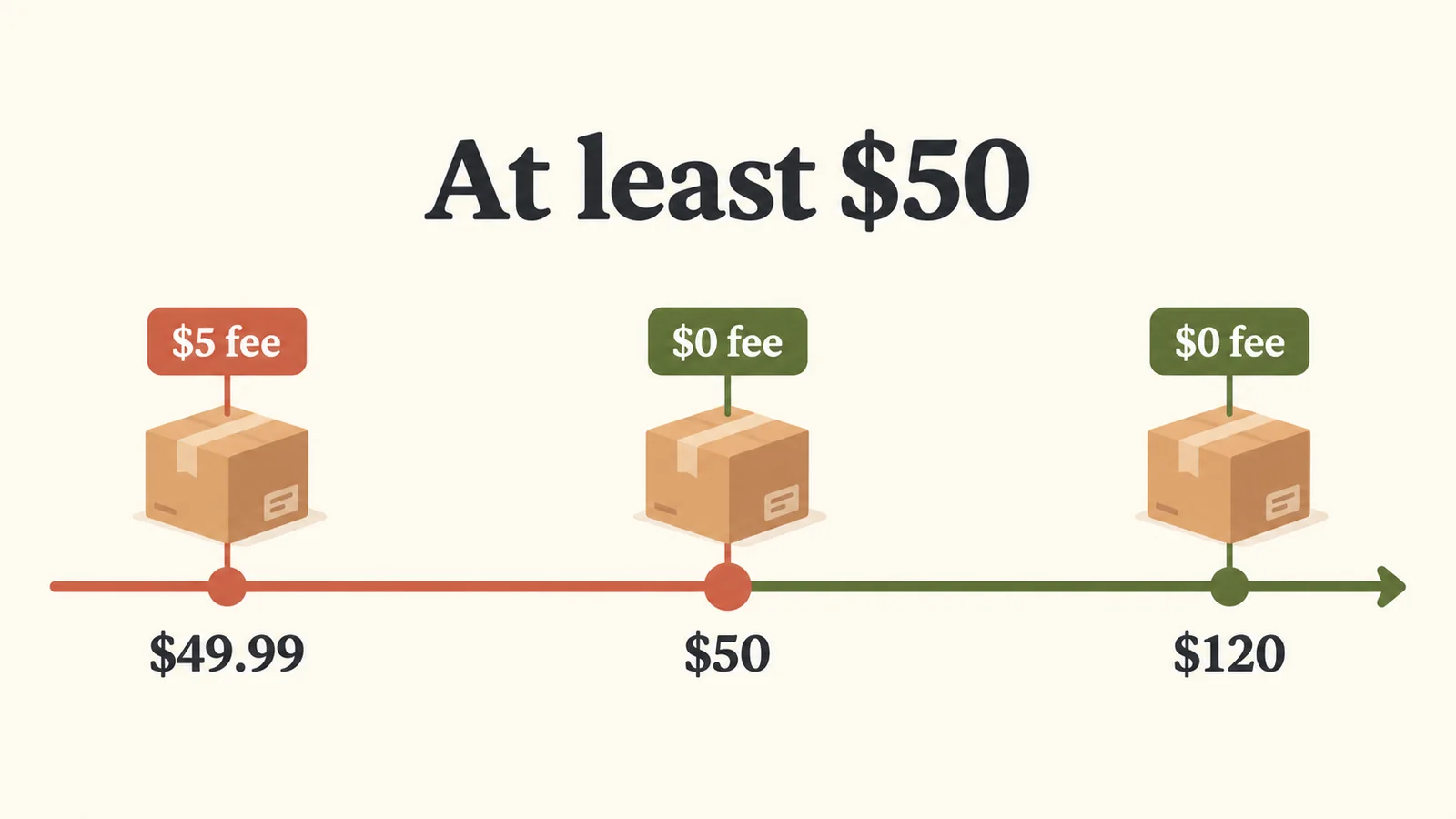
In this example, shipping becomes free at $50, including exactly $50.
Suppose a store offers free shipping on orders of $50 or more. A function charges shipping for an order of exactly $50 because its condition uses > instead of >=.
A useful request identifies the rule, the file to investigate, and the check that distinguishes a correct fix:
Shipping should be free when the order subtotal is at least $50. Reproduce the failure at exactly $50, make the smallest fix, and check values below, at, and above the threshold. Keep the shipping fee below the threshold unchanged.
The relevant result is a small, reviewable change plus evidence that the boundary now behaves correctly. A confident explanation without the test result is not enough. The first-task tutorial includes a downloadable exercise for this example.
You can apply the same pattern to your own work: state the observed behavior, state the required behavior, identify what must stay unchanged, and name a check.
Is Codex useful if you are not a developer?

Choose a task whose result you can describe, check, and undo.
It can help you understand code and make bounded changes, but the task still needs a reviewer who can judge the outcome. You may be able to inspect a changed heading or verify a simple calculation yourself. Authentication changes, data migrations, and payment logic require deeper review.
Use these three questions before choosing a first task:
- Can I describe a specific result? “The button should be disabled while saving” is concrete.
- Can I check that result? A visible state, a calculation, or an existing test gives you evidence.
- Can I undo the change without losing other work? A known starting point makes experimentation manageable.
When the answer to one is no, begin with an explanation or investigation task. Ask Codex to locate the relevant code and explain the options before asking it to change anything. For a broader discussion of what changes when an AI can act through tools, see personal AI agents and chatbots.
What you still need to decide
Codex can work within an environment; it cannot supply requirements you have never settled. If “correct” is unclear, agree on the intended behavior first. If the environment cannot run the application or tests, treat any suggested fix as unverified until you can check it.
OpenAI’s best practices emphasize context, testing, and review. In practice, that means reading the changed lines, checking the relevant behavior, and asking which checks were not run. A passed test is useful evidence about what the test covers, rather than proof that the entire application is correct.
Account access is a separate decision. Local clients support ChatGPT sign-in and API-key authentication, while cloud use requires ChatGPT sign-in. API-key usage follows API billing rather than included ChatGPT plan credits. Check the authentication documentation for the current conditions; plan prices and usage allowances belong in the pricing and limits guides.
Pick your first task
Choose one change that you can explain and verify in a few sentences. If you already have Codex working, use the getting-started exercise in this collection. If setup is still unfinished, complete installation first.
After you have completed a task and reviewed its result, the existing practical Codex tips can help with recurring work. Use the CLI settings guide when you have a specific configuration problem to solve.
Explore the Codex guides for the next step.