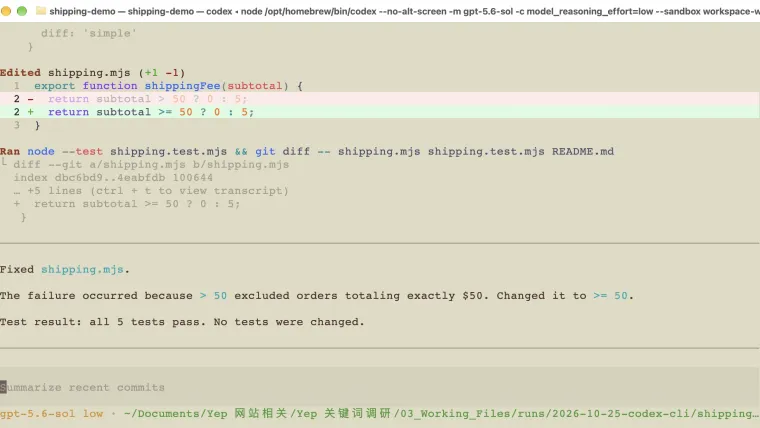
Codex CLI lets you ask Codex to work on files from a terminal—the window where you type commands. Open your project folder, describe one change, then check the files and run the project’s tests. You can follow this guide with a tiny shipping-fee example: orders of $50 or more should ship free, but the starter charges $5 for an order of exactly $50. You do not need to understand every line of code to see the mistake. The goal is to learn where to type your request, how to see what changed, and how to check the result yourself.
What you need before starting
CLI means command-line interface. It is the text-based way to use Codex. The official CLI overview describes it as a tool that can read files, edit code, and run commands in your project.
For this exercise, you need:
- Codex CLI installed and signed in. Use the installation guide or login guide if either step is unfinished.
- Node.js 20 or newer. Node runs the small JavaScript example and its checks. Type
node --versionto check whether it is available. - Git. Git records versions of files so you can compare the starting code with the edited code. Type
git --versionto check it. - The shipping practice ZIP. Download it and unzip it. There are three files and no extra packages to install.
The practice project is separate from your own work. Its only job is to calculate a made-up shipping fee. It does not take payments, contact a shop, or send customer information anywhere.
1. Open the practice folder in your terminal
On a Mac, open Terminal. On Windows, open the terminal where you installed Codex. If you installed it inside WSL, use that Linux terminal for this exercise too.
Type cd , including the space, followed by the path to the unzipped folder. On a Mac, you can drag that folder from Finder into Terminal to insert its path. Press Enter.
For example, if you unzipped the file in your Mac’s Downloads folder:
cd ~/Downloads/codex-cli-shipping-practicecd means “change directory.” In plain English, it tells the terminal which folder to work in. Your own folder may be somewhere else, so use its actual path.
Run these commands one at a time:
git init
git add README.md shipping.mjs shipping.test.mjs
git -c user.name="Practice" -c user.email="practice@example.invalid" commit -m "Save practice starting point"
These commands save the three starting files in a local Git history. The name and email apply only to this command; the example address is not a real contact address. Nothing is uploaded.
Only do this setup in the new practice folder. An existing work project may already have Git history and unfinished changes.
The file README.md explains the rule. shipping.mjs contains the calculation. shipping.test.mjs checks five order amounts: $0, $25, $49.99, $50, and $75.
2. See the bug before asking for a fix
In the same terminal, run:
node --test shipping.test.mjsA test is an automatic check of an expected result. Here, the checks ask questions such as “Does a $25 order cost $5 to ship?”
The starting project should report four passing tests and one failing test. The failing amount is exactly $50. The code charges $5, while the test expects $0.
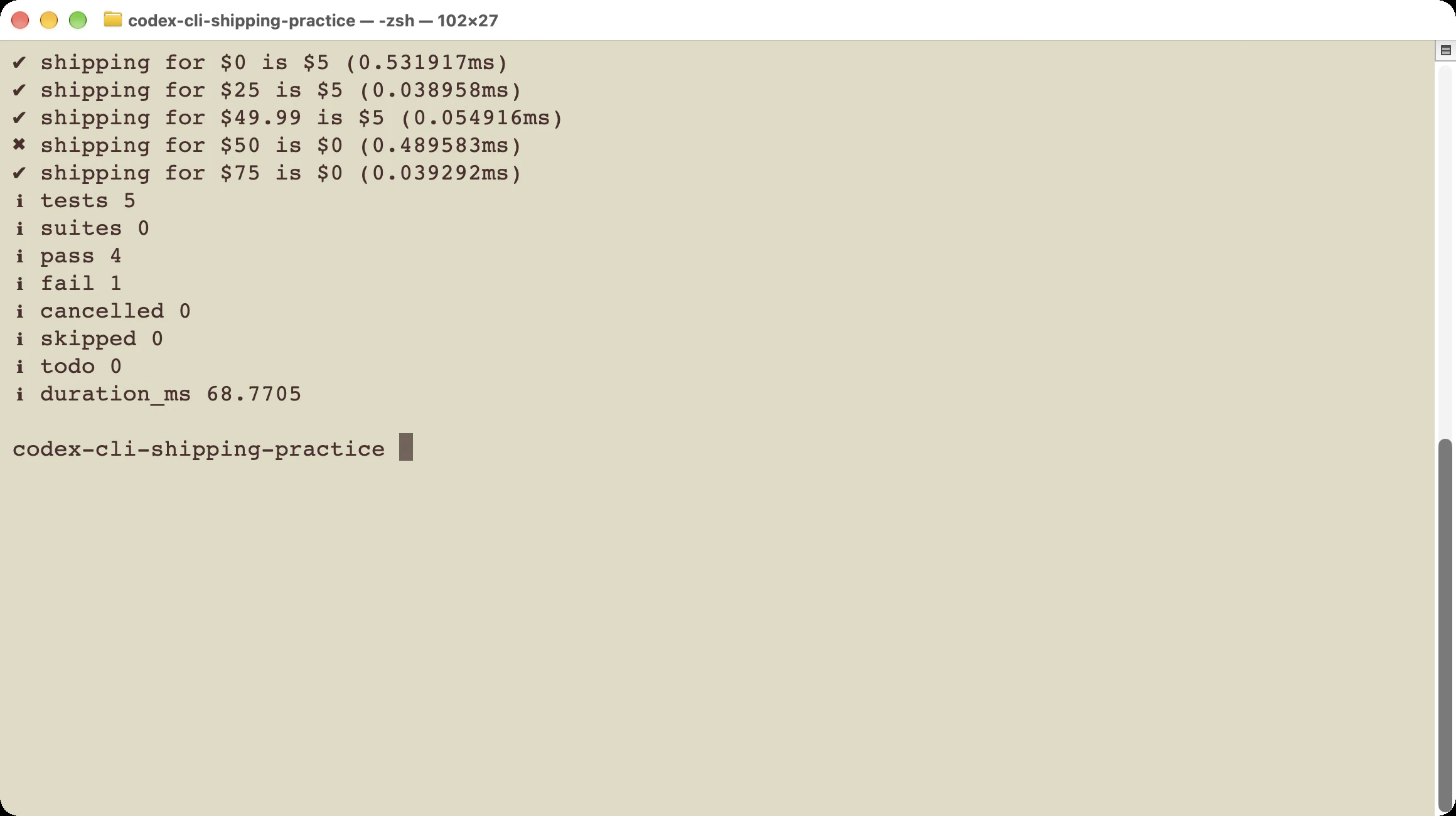
The failed check gives us a specific problem to fix. A red test result is expected at this stage.
If you see “command not found” or “cannot find module,” you have not reached this bug yet. First check that Node is installed and the terminal is inside the folder containing shipping.test.mjs.
3. Start Codex and describe the result you want
Type this in your terminal:
codexYou should see the Codex text interface. Check the folder shown near the top before asking it to edit files. If a trust question appears, confirm only after checking that it names the practice folder you just created.
You are now typing into Codex’s chat area. Paste this request, then press Enter:
Orders of $50 or more should get free shipping.
Read README.md, shipping.mjs, and shipping.test.mjs.
Run the tests and explain the failing case in plain English.
Make the smallest fix in shipping.mjs, then run the tests again.
Do not change the expected test results or install packages.
This request gives Codex three useful things: the business rule, the files to read, and a way to check its work. You can name files directly, as above. The current CLI reference also documents typing @ to find and attach a project file.
If Codex asks to run a command, read what it wants to do. For this exercise, reading the three files, changing the calculation, and running the existing test command are enough. If it proposes something larger, ask why that is needed before continuing.
A useful follow-up is:
Keep this limited to the shipping rule.
Explain any extra file changes before making them.
4. Look at the actual change
After Codex finishes, type this inside its chat area:
/diffA diff is a before-and-after view of file changes. Lines marked with - were removed; lines marked with + were added. Those markers are part of the comparison, not characters you should add to the code.
For this exercise, the important change is small:
-  return subtotal > 50 ? 0 : 5;
+  return subtotal >= 50 ? 0 : 5;
> means “more than.” >= means “at least.” The old line misses an order of exactly $50. The new line includes it.
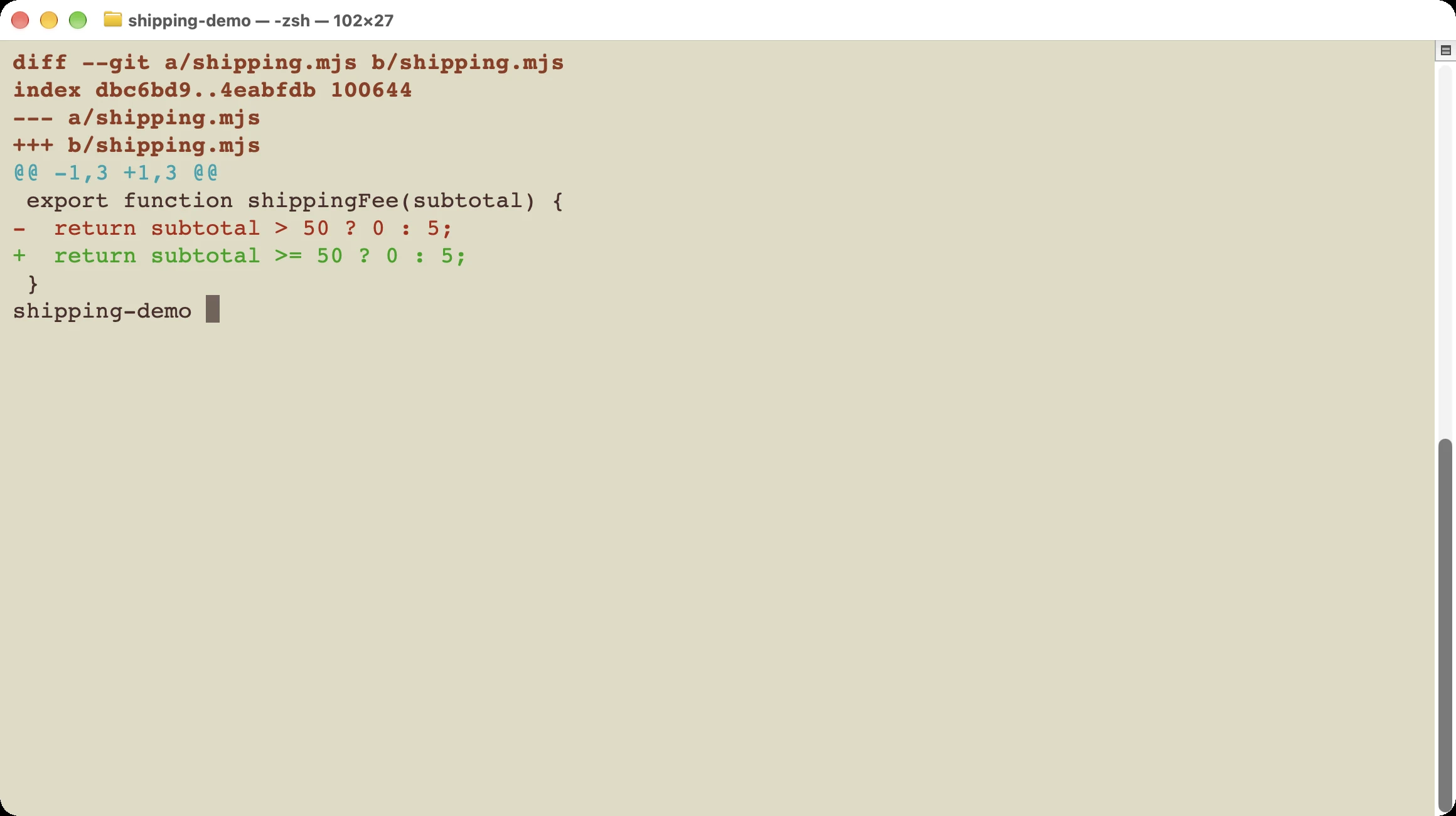
The same edit can be inspected from the ordinary terminal with git diff -- shipping.mjs, as shown here.
Check the file list too. For this example, only shipping.mjs needs to change. If the expected answers in shipping.test.mjs changed instead, ask Codex to restore those answers and fix the calculation.
The official slash-command guide explains /diff and other commands entered inside Codex. You do not need to learn the whole list before doing this exercise.
5. Run the checks yourself
You can ask Codex to run tests, but you should also know how to repeat the check. Type /quit inside Codex to return to the ordinary terminal. Then run:
node --test shipping.test.mjs
git status --short
git diff -- shipping.mjs
The first command should now report five passes and zero failures. The second lists changed files. The third displays the edit again.
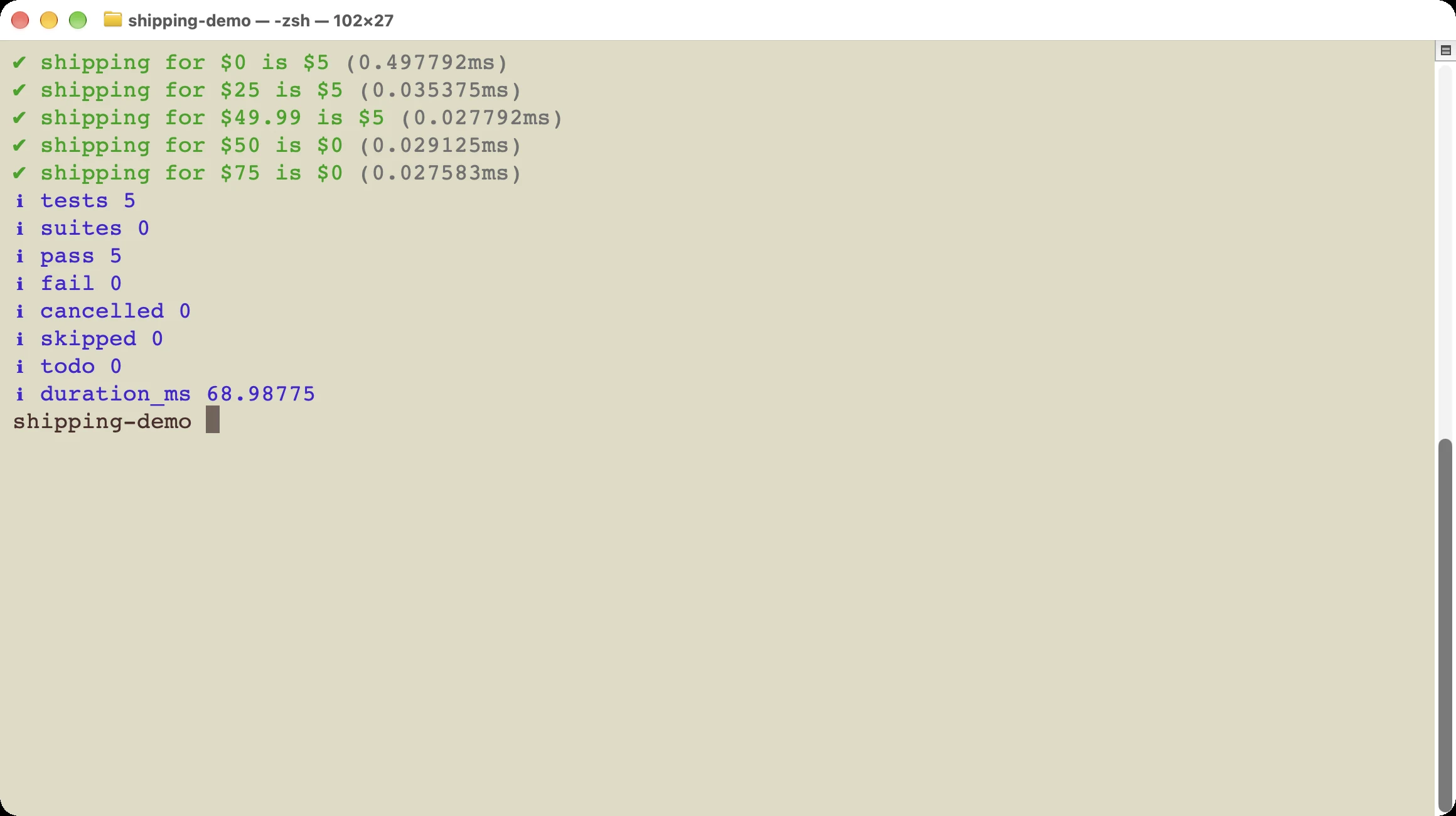
All five existing checks pass after the fix. The test expectations stay the same.
Do not treat five green checks as proof that an entire shopping site is correct. They cover the five amounts in this small example. A real shop would need rules for things such as discounts, refunds, currencies, and invalid inputs.
For a real project, use its documented test command. If you do not know that command, ask Codex to find it in the project’s instructions and explain what it checks before running it.
6. Leave the session and return later
/quit leaves the Codex interface. It does not undo saved file edits. Your edited files and your chat history are different things: one is the work on disk, and the other is the conversation about that work.
From the same project folder, run:
codex resumeChoose the conversation for that project. The current command reference also provides codex resume --last to reopen the most recent chat for the current folder. Use the picker when you are unsure which chat you need.
Before continuing, ask Codex to inspect the current files. A useful request is:
Check the current file changes before doing anything else.
Tell me what is already fixed and whether any tests still fail.
This matters when you or another tool changed files after the earlier conversation. An old answer is not a fresh check of the project.
What if your screen looks different?
This walkthrough uses a local practice project on macOS. The tested setup was Codex CLI 0.146.0 and Node.js 25.9.0 on October 25, 2026. Commands and interface labels can change between releases.
During setup, the installed CLI rejected the account’s newer default model and explicitly requested a newer client. The example was run with a model that this installed version offered. That does not mean you need the same model to fix this bug.
If your error says a model requires a newer Codex version, follow the update instructions first. Repeatedly changing the task wording will not fix an incompatible client. If you hit a usage limit instead, use the usage guide to check the remaining allowance and reset time.
Try one small change of your own
Start with the downloadable practice folder. Get the five original checks to pass, then explain the one-line change in your own words. If you can say why exactly $50 was wrong before and correct afterward, you have checked more than a success message.
For your own project, choose a similarly small task: fix one wrong label, correct one calculation, or add one missing check. Tell Codex what should happen, name the relevant files if you know them, and decide how you will verify the result before it starts. The first-task guide has more help choosing a manageable starting point.