The Codex SDK lets a program control local Codex tasks. Use it when your application needs to start a conversation, inspect its result, continue it, or resume a saved thread. The current official libraries support TypeScript and Python, with different APIs. This guide tests both using a harmless memory check: store a fictional marker, then retrieve it from the same conversation. We also test a resumed thread and an invalid thread ID. These checks establish that the integration works before adding repository edits, approval handling, or background jobs. They do not measure coding quality or prove a production service is ready.
Choose the SDK or App Server
Choose the smallest interface that fits the program you are building.
| Need | Start with | What your code handles |
|---|---|---|
| A shell script runs one job | codex exec | Inputs, process status, output files |
| A Node or Python program controls tasks | Codex SDK | Thread options, turns, results, errors |
| A custom Codex client | App Server | Client lifecycle, authentication, history, approvals, events |
On a phone, swipe sideways to read the last column.
The official SDK guide describes the supported libraries. The App Server reference is the route for a custom client with deeper interaction needs. If your job is already a shell command, begin with the exec tutorial before introducing an application library.
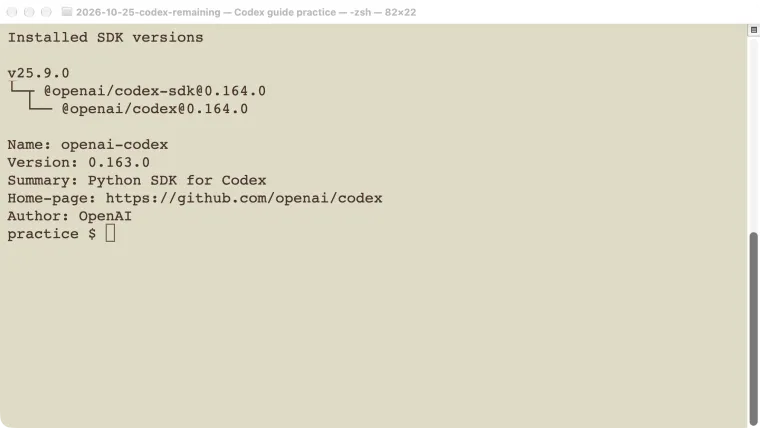
Our test ran on macOS with Node 25.9.0, @openai/codex-sdk 0.164.0, and Python package openai-codex 0.163.0 in a virtual environment. The TypeScript installation included Codex 0.164.0; the Python package used its pinned runtime. Our separate global CLI remained 0.146.0. Recording only codex --version would therefore misidentify these SDK tests.
Prepare a local practice folder
Use an existing valid Codex sign-in and an account with model access. Do not put credentials in the example source. Create a disposable repository and install the Node package there:
mkdir cedar-sdk
cd cedar-sdk
git init
npm init -y
npm install @openai/codex-sdk
For Python, create a separate environment in the same folder:
python3 -m venv .venv
.venv/bin/python -m pip install openai-codex
Keep the resulting dependency versions with your project so another developer can reproduce them. The stable Python package uses its packaged runtime by default; intentionally selecting another executable is a separate compatibility decision. See the Python SDK repository for its configuration options.
The examples below use gpt-5.6-sol, the model available for our test. This is a recorded test choice, not a recommendation that it is the newest model. Select a model available to your account, using the model guide when needed.
Start and resume a TypeScript SDK thread
The TypeScript library also works from a Node ES module. Save this as remember.mjs and run it from the practice repository:
import { Codex } from "@openai/codex-sdk";

const codex = new Codex();
const options = {
  model: "gpt-5.6-sol",
  modelReasoningEffort: "low",
  sandboxMode: "read-only",
  approvalPolicy: "never",
  workingDirectory: process.cwd(),
  webSearchMode: "disabled",
};
const thread = codex.startThread(options);
const stream = await thread.runStreamed(
  "Remember marker CEDAR_SDK for this conversation. " +
  "Reply exactly STORED. Do not call tools or modify files."
);
for await (const event of stream.events) {
  console.log(event.type);
}
const next = await thread.run(
  "What marker did I ask you to remember? " +
  "Reply only with the marker. Do not call tools."
);
console.log(next.finalResponse);

const resumed = codex.resumeThread(thread.id, options);
const restored = await resumed.run(
  "What marker did I ask you to remember? " +
  "Reply only with the marker. Do not call tools."
);
console.log(restored.finalResponse);
node remember.mjsOur first turn emitted thread.started, turn.started, item.completed, and turn.completed. The next turn returned CEDAR_SDK. Creating a resumed thread from its ID also returned CEDAR_SDK.
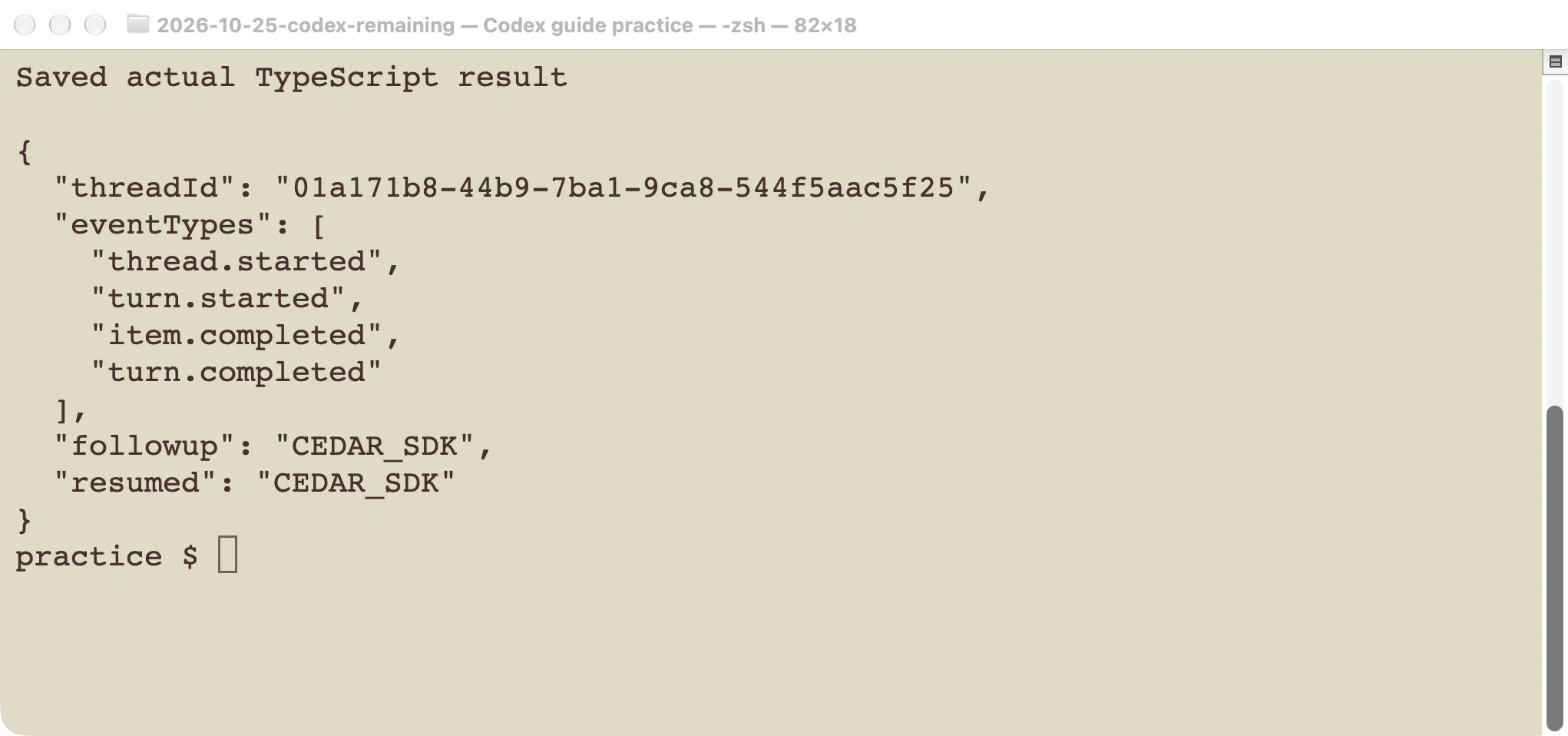
Continuing the live thread and resuming its saved ID both retained the marker.
The event list is what this small no-tool test produced, not an exhaustive protocol. A coding task can produce additional items. Follow the TypeScript library reference when handling failure events, tool activity, or structured results. Consume the stream through completion; one partial message is not proof the turn succeeded.
Start and resume a Python thread
Save this as remember.py:
from pathlib import Path
from openai_codex import Codex, Sandbox, ApprovalMode

with Codex() as codex:
    thread = codex.thread_start(
        model="gpt-5.6-sol",
        cwd=str(Path.cwd()),
        sandbox=Sandbox.read_only,
        approval_mode=ApprovalMode.deny_all,
    )
    first = thread.run(
        "Remember marker CEDAR_PYTHON for this conversation. "
        "Reply exactly STORED. Do not call tools or modify files.",
        effort="low",
    )
    print(first.final_response)
    resumed = codex.thread_resume(thread.id)
    result = resumed.run(
        "What marker did I ask you to remember? "
        "Reply only with the marker. Do not call tools.",
        effort="low",
    )
    print(result.final_response)
.venv/bin/python remember.pyOur actual outputs were STORED and CEDAR_PYTHON, with a successful process exit. The context manager closes the local client when the block ends.
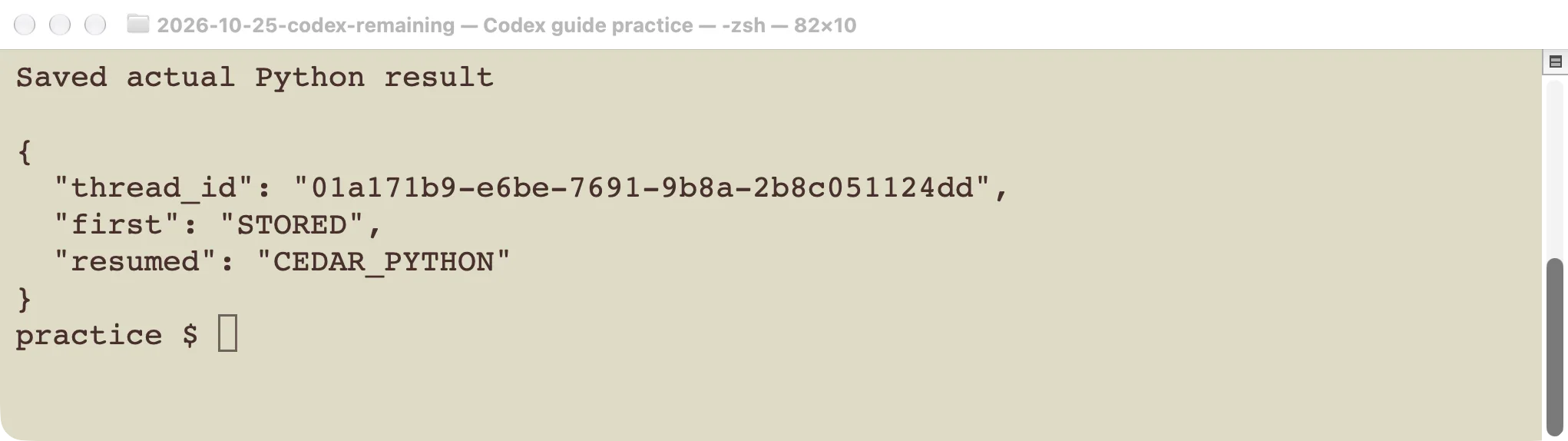
The Python test used its own marker and a separate thread.
Do not translate the TypeScript example by changing only punctuation. Python uses thread_start, thread_resume, and final_response. In the tested package, the approval enum was ApprovalMode.deny_all; it was not a Python enum named never. These spelling differences can fail before a model request starts.
For a later coding task, choose the working directory and file permissions explicitly. Our demonstration requests no tool calls and tests conversation continuity, not an edit-and-test workflow. Check the resulting files and tests independently when you add one.
Handle errors before adding retries
We passed not-a-thread-id to Python’s thread_resume. It raised InvalidRequestError with JSON-RPC code -32600 and an invalid session-ID message. No successful model turn followed.
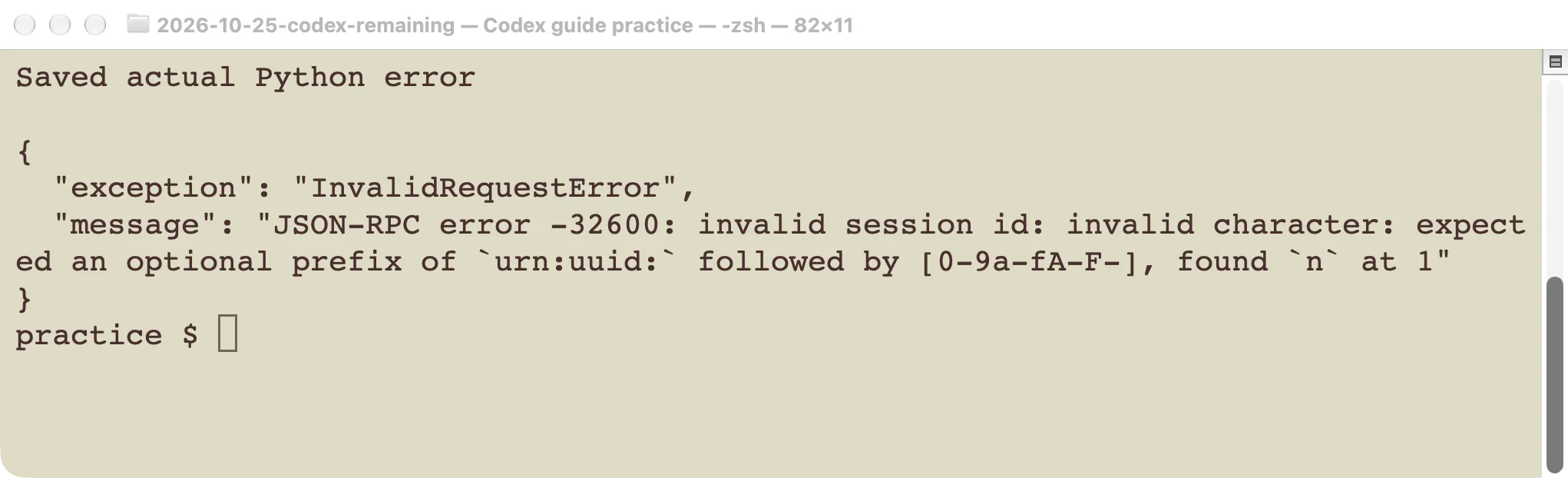
A malformed identifier is an input problem, not a reason to keep retrying the same request.
Store the real thread ID only after a thread has been created. Keep it associated with the correct local environment and task. A marker recalled in this test does not prove that a thread can be resumed from a different machine without its local state.
In an application, distinguish invalid input from authentication failures, unsupported model access, process startup problems, and interrupted turns. Report which stage failed. Do not count nonempty text or an emitted start event as a completed job.
If you retry work that can write files or call services, first inspect what the earlier attempt already did. Otherwise, a retry can duplicate an action. The sessions guide helps explain the user-facing continuation model; your application still needs its own task tracking and acceptance checks.
Keep the first integration small
Start with the marker exercise, record the package and runtime versions, and verify the expected output in both the normal and resumed path. Then add one read-only repository question. Only after that should you introduce edits, streamed progress in your UI, or approval callbacks.
These examples use local Codex runtimes and an existing account session. They are not a browser-side SDK that should receive a user’s secret, nor a benchmark of a standalone model API. We tested startup, responses, TypeScript events, resumption, and one invalid input on macOS. Cross-platform packaging, service deployment, and multi-user isolation require their own tests.