The Codex vs Cursor choice starts with the workflow you are comparing. Cursor is an editor with its own agent features; Codex can be used through a terminal, desktop workflow, or an extension inside a compatible editor, including Cursor. Selecting the Codex extension in Cursor therefore is not the same experiment as selecting Cursor’s own agent. This guide compares documented routes, context, permissions, review, and plan boundaries. We checked the Cursor installer and current pricing page, but did not complete matched signed-in coding tasks. No speed or code-quality winner is claimed from those setup checks.
Identify which agent receives the request
OpenAI’s IDE documentation lists Cursor as a compatible host for the Codex extension. Our integration guide explains that route. It uses the Codex panel and its own account flow.
Cursor’s native agent is a separate product workflow. Use Cursor’s official agent documentation to check its current controls. Before evaluating a result, record the selected agent and model rather than simply saying the request ran “in Cursor.”
| Workflow | What it means | What to verify |
|---|---|---|
| Codex CLI in a terminal | A terminal-based Codex task | Working directory, command, account, and output |
| Codex extension in Cursor | Cursor hosts the Codex interface | Extension activation and Codex sign-in |
| Cursor’s own agent | Cursor’s native agent receives the task | Selected agent/model and Cursor plan |
| Two agents editing together | Concurrent work in one or more checkouts | File ownership, paths, and integration |
Keeping these routes explicit prevents both billing confusion and invalid benchmark conclusions.
Compare context and review, not only reply speed
An editor can make open files and selections easier to attach and review. A terminal can make the working directory and commands explicit. Those are workflow differences; they do not establish which model produces a better correction.
For a fair task, supply the same README, relevant source, and acceptance test. Check whether each selected agent uses the intended file. Then inspect the actual diff and run the test independently.
If you mostly work in an editor, judge how clearly you can attach context, inspect changed lines, and recover from an unwanted edit. If you rely on shell scripts, consider whether a Codex exec workflow fits better. The app vs CLI comparison covers that interface decision.
Check the current plan before paying
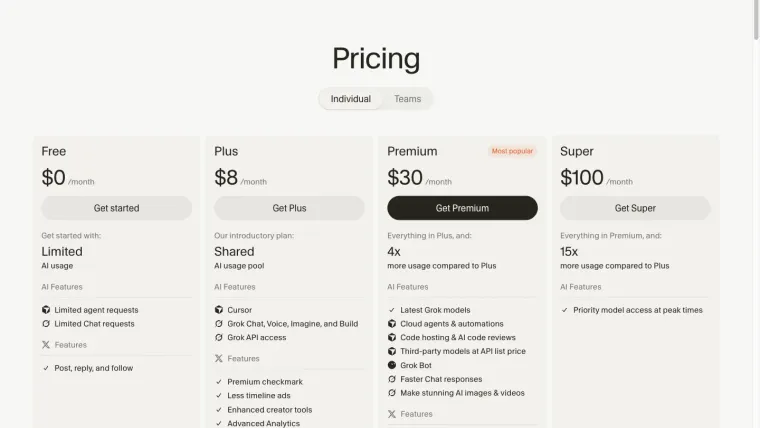
The live Cursor pricing page listed limited free agent and chat use at our October 25, 2026 check. It described additional paid capabilities separately. Older help material used different plan names, so use the current offer shown to your account before buying.
Codex access and limits depend on its own authentication and plan route; see Codex pricing. Installing Codex in Cursor does not transfer Cursor’s included model usage into the Codex account or make every integration free.
Record any separate third-party model charge, usage allowance, or upgrade prompt. A free editor download, a paid subscription, and a model API balance answer different cost questions.
Run one controlled practice task
Create two copies of the same non-sensitive project. Use one selected agent per copy. Keep the model, permissions, file context, and starting state recorded so differences can be interpreted.
Our prepared fixture asks for free shipping at exactly $50, with tests below, at, and above the threshold. The same request can be supplied to each tool: inspect the requirements, run the tests, make the smallest correction, preserve the tests, and show the diff. Neither tool should deploy, commit, or contact external services during this trial.
We did not complete this matched native-agent trial. The fixture’s existence and the installer’s version do not prove a successful repair in either editor workflow. For an actual completed exercise, follow the separate first-task tutorial.
Avoid concurrent changes to the same file
Codex and Cursor’s own agent can be used for different tasks, but avoid overlapping edits without clear ownership. The final diff may contain changes from both, making an apparent success difficult to reproduce or undo.
Use separate worktrees when independent changes justify separate checkouts. Record which directory each task uses. A new chat is not file isolation, and a test in one checkout does not verify another checkout’s result.
After combining changes, run the relevant checks again. Review the integrated behavior rather than relying on each agent’s separate completion message.
Make the choice from an accepted result
Compare the complete effort: setup, usable access, context selection, correction, review, and verification. Record failures at the stage they occurred. A login failure is not a coding-quality score, and a fast reply is not a passing test.
Choose the workflow that helps you consistently reach a reviewed result under the access and budget you actually have. For other free routes, check alternatives. For an error inside either Codex route, use the troubleshooting guide.
This article establishes the product and integration distinctions and a controlled comparison procedure. A matched coding benchmark remains untested, so it supplies no universal winner.